


Kestrel Sportsman to 5700 Elite Upgrade Download Only
Firmware upgrade that can be installed on a Kestrel 5 Series Sportsman, converting it into a full Kestrel 5700 Elite model with its more advanced extreme long range features.
Please note: Selecting this purchase means that you currently already have a PC connection accessory (Bluetooth dongle or USB Transfer Cable). If you do not, you will need to purchase product with connection accessory options.
Kestrel Sportsman to 5700 Elite Upgrade Download Only Overview
Firmware upgrade that can be installed on a Kestrel 5 Series Sportsman, converting it into a full Kestrel 5700 Elite model with its more advanced extreme long range feature set. Now the Kestrel Sportsman owner who is ready to shoot beyond supersonic distances can upgrade to the 5700 Elite without having to trade in their unit, or even leave home!
Features:
- Compatible with the Kestrel 5 Series Sportsman Weather Meter with Applied Ballistics, including the CONX model sold in the Bushnell Elite 1 Mile CONX kit.
- Elite performance features improve accuracy at transonic and subsonic bullet flight distances. Includes Drop Scale Factor and Custom Drag Models.
- Elite utility features expand the shooter's capabilities with additional gun/bullet profiles, multiple targets, expanded ballistics table, and a range card.
- Upgrading to Elite also unlocks advanced features in the Kestrel LiNK Ballistics app, including multi-target view and access to Applied Ballistics Litz Custom Drag Models.
What You get with a Firmware Upgrade:
- E-mail firmware upgrade file (The file will be emailed within 48 hours of purchase but will not be sent between 2pm Friday and 9am Monday).
- Enter your Kestrel 5 Series Sportsman serial number and purchase the Kestrel Elite upgrade.
- You will receive an e-mail with your firmware file. Generally we send the file same day or next day, but occasionally it may take up to two business days.
- You will need the Kestrel LiNK Dongle or USB Data Transfer Cable to perform the upgrade.
- After you receive the firmware upgrade file AND have the dongle or cable, you can download and install LiNK for Windows or LiNK for OSX/macOS.
- Follow the instructions found in the email sent with the firmware file to install the firmware upgrade.
Please Note: Firmware upgrades cannot be returned for credit once sent by NK, as there is no way for us to disable an upgrade once sent. Please reach out to us with any questions before confirming your order. Thank you.
- Aerodynamic Jump Correction
- Applied Ballistics Custom Drag Models
- *Connect with LiNK Compatible Range Finders
- Coriolis Correction
- Create and store 10 Targets
- Create and store up to 30 Gun/Bullet Profiles
- G1/G7 Drag Models
- Muzzle Velocity Calibration
- Range Card
- Spin Drift Correction
- Supports Mil, MOA, Clicks
- Subsonic Range Drop Scale Factor Calibration
- Standard and Night Vision Preserving Backlight
- Target Range Estimator
- Zero Offset
* Applies to LiNK models only
The specs on this page relate to all Kestrel 5 series meters. Just because a measurement is listed in this chart does not necessarily mean that it is included with all meters. To see a listing of all measurements and features for this meter, please click on the In-Depth tab above.
| SENSORS | ||||
|---|---|---|---|---|
| SENSORS | ACCURACY | RESOLUTION | SPECIFICATION RANGE | NOTES |
| Wind Speed | Air Speed | Larger of 3% of reading, least significant digit or 20 ft/min Speed |
0.1 m/s 1 ft/min 0.1 km/h 0.1 mph 0.1 knots 1 B* 0.1 F/S* |
0.6 to 40.0 m/s 118 to 7,874 ft/min 2.2 to 144.0 km/h 1.3 to 89.5 mph 1.2 to 77.8 knots 0 to 12 B* 2-131.2* |
1 inch|25 mm diameter impeller with precision axle and low-friction Zytel® bearings. Startup speed stated as lower limit, readings may be taken down to 0.4 m/s |79 ft min|1.5 km/h |.9 mph |.8 kt after impeller startup. Off-axis accuracy -1% @ 5º off axis; -2% @ 10º; -3% @ 15º. Calibration drift < 1% after 100 hours use at 16 MPH|7 m/s. Replacement impeller (NK PN-0801) field installs without tools (US Patent 5,783,753). Wind speed calibration and testing should be done with triangle on impeller located at the top front face of the Kestrel. Measuring wind speeds above 60 m/s / 134.2 mph can damage the impeller |
| Ambient Temperature |
0.9 °F 0.5 °C |
0.1 °F 0.1 °C |
-20.0 to 158.0 °F -29.0 to 70.0 °C |
Airflow of 2.2 mph|1 m/s or greater provides fastest response and reduction of insolation effect. For greatest accuracy, avoid direct sunlight on the temperature sensor and prolonged sunlight exposure to the unit in low airflow conditions. Calibration drift is negligible for the life of the product. For further details, see Display & Battery Operational Temperature Limits. |
| Relative Humidity | 2%RH | 0.1 %RH | 10 to 90% 25°C noncondensing | To achieve stated accuracy, unit must be permitted to equilibrate to external temperature when exposed to large, rapid temperature changes and be kept out of direct sunlight. Calibration drift is typically less than ±0.25% per year. |
| Pressure |
1.5 hPa|mbar 0.044 inHg 0.022 PSI |
0.1 hPa|mbar 0.01 inHg 0.01 PSI |
25°C/77°F 700-1100 hPa|mbar 20.67-32.48 inHg 10.15-15.95 PSI |
Monolithic silicon piezo-resistive pressure sensor with second-order temperature correction. Between 1100–1600 mbar, unit will operate with reduced accuracy. Sensor may not operate above 1600 mbar and can be damaged above 6,000 mbar or below 10 mbar. Calibration drift is negligible for the life of the product. |
| Compass | 5° |
1° 1/16th Cardinal Scale |
0 to 360° | 2-axis solid-state magneto-resistive sensor mounted perpendicular to unit plane. Accuracy of sensor dependent upon unit’s vertical position. Self-calibration routine eliminates magnetic error from batteries or unit and must be run after every full power- down (battery removal or change). Readout indicates direction to which the back of the unit is pointed when held in a vertical orientation. Declination/variation adjustable for True North readout. |
| CALCULATED MEASUREMENTS | |||
|---|---|---|---|
| MEASUREMENT | ACCURACY (+/-) | RESOLUTION | SENSORS EMPLOYED |
| Air Density |
0.0002 lb/ft3 0.0033 kg/m |
0.001 lbs/ft3 0.001 kg/m3 |
Temperature, Relative Humidity Pressure |
| Air Flow | 6.71% |
1 cfm 1 m3/hr 1 m3/m 0.1m3/s 1 L/s |
Air Speed, User Input (Duct Shape & Size) |
| Altitude |
typical: 23.6 ft/7.2 m from 750 to 1100 mBar max: 48.2 ft/14.7 m from 300 to 750 mBar |
1 ft 1 m | Pressure, User Input (Reference Pressure) |
| Barometric Pressure |
0.07 inHg 2.4 hPa|mbar 0.03 PSI |
0.01 inHg 0.1 hPa|mbar 0.01 PSI |
Pressure, User Input (Reference Altitude) |
| Crosswind & Headwind/Tailwind | 7.1% |
1 mph 1 ft/min 0.1 km/h 0.1 m/s 0.1 knots |
Wind Speed, Compass |
| Delta T |
3.2 °F 1.8 °C |
0.1 °F 0.1 °C | Temperature, Relative Humidity Pressure |
| Density Altitude |
226 ft 69 m |
1 ft 1 m | Temperature, Relative Humidity Pressure |
| Dew Point |
3.4 °F 1.9 °C 15- 95% RH. Refer to Range for Temperature Sensor |
0.1 °F 0.1 °C |
Temperature, Relative Humidity |
| Evaporation Rate |
0.01 lb/ft2/hr 0.06 kg/m2/hr |
0.01 b/ft2/hr 0.01 kg/m2/hr |
Wind Speed, Temperature Relative Humidity Pressure, User Input (Concrete Temperature) |
| Heat Index |
7.1°F 4.0°C |
0.1 °F 0.1 °C |
Temperature, Relative Humidity |
| Moisture Content | Humidity Ratio (“Grains”) |
4.9gpp .7g/kg |
0.1 gpp 0.01 g/kg |
Temperature, Relative Humidity Pressure |
| Probability of Ignition (PIG) | PIG Accuracy dependent on proximity of inputs to reference table steps. | 10% | Temperature, Relative Humidity |
| THI (NRC) |
1.5 °F 0.8 °C |
0.1 °F 0.1 °C |
Temperature, Relative Humidity |
| THI (Yousef) |
2.3 °F 1.3 °C |
0.1 °F 0.1 °C |
Temperature, Relative Humidity |
| Relative Air Density | .0.3% | 0.1% | Temperature, Relative Humidity Pressure |
| Wet Bulb Temperature - Psychrometric |
3.2 °F 1.8 °C |
0.1 °F 0.1 °C |
Temperature, Relative Humidity Pressure |
| Wet Bulb Temperature - Naturally Aspirated (NWB TEMP) |
1.4 °F 0.8 °C |
0.1 °F 0.1 °C |
Wind Speed, Temperature Globe Temperature, Relative Humidity, Pressure |
| Wind Chill |
1.6 °F 0.9 °C |
0.1 °F 0.1 °C |
Wind Speed, Temperature |
| ADDITIONAL PRODUCT INFO | |
|---|---|
| Display & Backlight | Multifunction, multidigit monochrome dot-matrix display. Choice of white or red LED backlight. |
| Response Time & Display Update | Display updates every 1 second. After exposure to large environmental changes, all sensors require an equilibration period to reach stated accuracy. Measurements employing RH may require longer periods particularly after prolonged exposure to very high or very low humidity. WBGT requires about 8 minutes to reach 95% accuracy and about 15 minutes to reach 99% accuracy after exposure to large environmental changes. |
| Data Storage & Graphical display Min/Max/Avg History | Logged history stored and displayed for every measured value. Manual and auto data storage. Min/Max/Avg history may be reset independently. Auto-store interval settable from 2 seconds to 12 hours*, overwrite on or off. Logs even when display off except for 2 and 5 second intervals. Kestrel 5 series units hold over 10,000 data points. |
| data Upload & Bluetooth Data Connect Option | Wireless range up to 100ft. Connection requires optional USB data transfer cable or Kestrel Link Dongle or Kestrel LiNK app. Employs Kestrel Link protocol for data transmission with Link supported devices. (Kestrel LiNK for iOS/Android, Kestrel Link for PC/MAC). |
| Clock/Calendar | Real-time hours:minutes:seconds clock, calendar, automatic leap-year adjustment. |
| Auto Shutdown | User-selectable – Off, 15-60 minutes with no key presses. |
| Languages | English, French, German, Spanish. |
| Certifications | CE certified, RoHS, FCC, IC tested and WEEE compliant. Individually tested to NIST-traceable standards. |
| Origin | Designed and manufactured in the USA from US and imported components. Complies with Regional Value Content and Tariff Code Transformation requirements for NAFTA Preference Criterion B. |
| Battery Life | AA Lithium included. Up to 400 hours of use, reduced by backlight, alert light and buzzer, or Bluetooth radio transmission use. |
| Shock Resistance | MIL-STD-810g, Transit Shock, Method 516.6 Procedure IV; unit only; impact may damage replaceable impeller. |
| Sealing | Waterproof (IP67 and NEMA-6) |
| Display & Battery Operational Temperature Limits | 14° F to 131° F | -10 °C to 55 °C Measurements may be taken beyond the limits of the operational temperature range of the display and batteries by maintaining the unit within the operational range and then exposing it to the more extreme environment for the minimum time necessary to take reading. |
| Storage Temperature | -22.0 °F to 140.0 °F | -30.0 °C to 60.0 °C. |
| Size & Weight | 5.0 x 1.9 x 1.1 in | 12.7 x 4.5 x 2.8 cm, 4.3 oz | 121 g. (Lithium battery included) |
Models & SKUs:
- Kestrel 5 Series Sportsman Weather Meter with Applied Ballistics (Brown): 0857SBRN
- Kestrel 5 Series Sportsman Weather Meter with Applied Ballistics with LiNK (Brown): 0857SLBRN
Kestrel Ballistics 5 Series Instruction Manuals
 How to Get Started with your Kestrel Ballistics Unit
(Size: 184.7 KB)
User Guide Kestrel 5700 Ballistics Weather Meter and Kestrel 5700/5700X Elite Weather Meters with Applied Ballistics (Also 5700 Sportsman Instructions)
(Size: 795.1 KB)
How to Get Started with your Kestrel Ballistics Unit
(Size: 184.7 KB)
User Guide Kestrel 5700 Ballistics Weather Meter and Kestrel 5700/5700X Elite Weather Meters with Applied Ballistics (Also 5700 Sportsman Instructions)
(Size: 795.1 KB)
Kestrel Ballistics 5 Series Troubleshooting Documents
How can I submit a tax-exempt order using the website?
(Size: 915.2 KB)
Kestrel 5 Series Downloads
 Kestrel Firmware Update Files for OSX
(Size: 14 MB)
Kestrel Firmware Update Files for OSX
(Size: 14 MB)
Product Questions
Make sure Bluetooth® is turned ON on your phone. On the Kestrel, go to the Main Menu->Bluetooth and turn it ON. Press the center button while Bluetooth is highlighted and check to ensure that Conct is set to PC/Mobile and it shows Available. Next go to the application that you are connecting with on your phone and select the Kestrel as the device you would like to connect with. Please note: if you do not find the Kestrel on your phone’s “standard” Bluetooth connection screen, that does not mean that the Kestrel is not working properly. Please first go to the application and try to connect through the application. The Kestrel should connect.
... PermalinkAll models of the Kestrel 5000 Series have optical data ports that can be seen through the openings of the battery door. A USB Data Transfer Cable can be purchased separately, which plugs directly into the back of the Kestrel and extends to a USB port in your computer. You will NOT be able to connect a non-LiNK model unit to a mobile device (e.g., any device without a USB port).
... PermalinkThese programs handle uploading the weather data from the Kestrel to a specific device. This weather data can then be exported into MS Excel. You can also update your firmware any of these programs. Visit the Kestrel LiNK Software and Apps page to learn more.
... PermalinkYou can now upgrade your Kestrel 5700 to the Elite version using the Kestrel LiNK Ballistics application. Simply connect your Kestrel to the iOS or Android version of the Kestrel LiNK Ballistics app. Select Upgrade in the top left corner. Enter you credit card information for the purchase and the upgrade should start after payment is completed. The upgrade will look similar to a firmware update.
... PermalinkAs can be seen in the pictures below, place your thumb on the bottom of the unit and slide the latch from the “Locked” to the “Unlocked” position. The battery door should pop up enough that you can remove it. If you have trouble opening the battery door, some slight pressure DOWN on the battery door itself with your other thumb may help release the latch.
 ...
Permalink
...
Permalink
First slide in the tab at towards the top of the unit, then gently press the bottom part of the battery door down until it snaps into place. Ensure that the O-ring remains in place on the battery door when closing.
... PermalinkNo. Since the Kestrel 5 Series meters utilize only one AA battery, there is no need to use the battery shim to separate two AAA batteries as in the previous version.
... PermalinkYes. And you can now upgrade your Kestrel 5700 to the Elite version using the Kestrel LiNK Ballistics application. Simply connect your Kestrel to the iOS or Android version of the Kestrel LiNK Ballistics app. Select Upgrade in the top left corner. Enter you credit card information for the purchase and the upgrade should start after payment is completed. The upgrade will look similar to a firmware update.
... PermalinkNo. Currently ONLY the Kestrel Sportsman Weather Meter with Applied Ballistics or the Kestrel 5700 Ballistics Weather Meter can be upgraded to the Kestrel 5700 Elite model.
... PermalinkAll of the Kestrel 5000 series units have the Night Vision option in addition to the standard white backlight. There is a menu selection that allows the customer to toggle between both options.
... PermalinkWind Speed – NK sells factory calibrated replacement impellers that can easily be installed by the customer. NK recommends replacing the impeller every 2-3 years depending on usage.
Humidity – The Kestrel 5 Series and DROP data loggers employ a highly accurate, calibrated, digital humidity sensor. Based on the sensor manufacturer's specifications and NK testing, drift on this sensor over time is minimal and field recalibration is likely to degrade accuracy rather than improve it. Factory calibration to validate and certify accuracy at a minimum of two RH points is available from NK. Kestrel 5000 series units can also be recalibrated in the field using our kit RH Recalibration Kit . During the five-year warranty period, NK will repair, recalibrate or replace any Kestrel 5 Series or DROP which drifts more than +/-1% RH/year since the date of manufacture.
Temperature – The thermistor in the Kestrel 5 series should not need to be recalibrated. If you think your sensor is incorrect, please contact techsupport@nkhome.com
Pressure – The pressure in the Kestrel 5 series should not need to be recalibrated. If you think your sensor is incorrect, please contact techsupport@nkhome.com
... PermalinkKestrel 5 series units with LiNK will need to use the Kestrel LiNK Wireless Dongle to connect with a computer. The Kestrel 5 series will not work with any internal Bluetooth modules. To connect, insert the Kestrel LiNK Dongle into an open USB port. On the Kestrel, go to the Main Menu->Bluetooth and turn it ON. Set Conct to "PC / Mobile." Open the application on the computer and select the Kestrel as the device to connect to. There is no more “pairing," "COM port numbers," or "PIN Codes" to worry about for those familiar with the 4000 series.
... PermalinkPlease see our graphing guide:
LiNK (Kestrel)
How to graph weather data from LiNK CSV files
(Size: 667.5 KB)
Yes! The Kestrel 5 Series now has both Android and iPhone integration through our Kestrel LiNK iOS and Android Apps. Kestrel LiNK iOS and Android apps allow LiNK enabled Kestrel 5 Series Meters and DROPs to connect wirelessly with mobile devices to view real-time measurements, receive on-screen alerts, download data and perform firmware updates. The Kestrel LiNK Ballistics app, designed specifically for the the Sportsman , the Kestrel 5700 series or meters, and the Kestrel 5700 Elite meters, provides full gun management and access to the Applied Ballistics library of G1/G7 curves (Sportsman and 5700) and custom drag models (5700 Elite).
... PermalinkFor overall setting up profiles and using the Kestrel please see the following document:
Kestrel Ballistics 5 Series Instruction Manuals
How to Get Started with your Kestrel Ballistics Unit
(Size: 184.7 KB)
Any of the LiNK Ballistics applications will allow you to transfer gun profiles to your Kestrel. So Kestrel LiNK Ballistics for iOS or Kestrel LiNK Ballistics for Android will allow you to use a mobile device to transfer gun profiles but you would need to have the LiNK (i.e., Bluetooth) model. If you are using a Windows computer, you can use the Applied Ballistic Profile Loader (Version 42 or higher).
NOTE : Please be aware that currently the Applied Ballistics Profile Loader cannot be used with Bluetooth for Kestrel 5700 devices; therefore you will need to purchase the USB Transfer cable to transfer files with a Windows PC.
... PermalinkUnfortunately we do not have a ballistics application that runs on a MAC.
... PermalinkThe free Kestrel LiNK Ballistics app for Android and iOS is the ideal companion to the Kestrel 5700 Ballistics series of Weather Meters. Build and manage your gun/bullet profiles and download them to your Kestrel Ballistics unit before you set out. The app is also the perfect way to display your ballistic solutions remotely via Bluetooth. Another option is purchasing a Kestrel HUD
... PermalinkYou can now upgrade your Kestrel 5700 to the Elite version using the Kestrel LiNK Ballistics application. Simply connect your Kestrel to the iOS or Android version of the Kestrel LiNK Ballistics app. Select Upgrade in the top left corner. Enter you credit card information for the purchase and the upgrade should start after payment is completed. The upgrade will look similar to a firmware update.
... PermalinkPlease review the list found here:
3rd Party Hardware and Software
We have created quick start guides for connecting to each of these below:
Vortex Fury 5000 AB Instructions
Vortex Fury 5000 AB Video Tutorial:
Kestrel 5 Series 3rd Party Hardware Connection Instructions
How to connect a Bushnell 1800 Nitro to a Kestrel 5700 unit
(Size: 110.2 KB)
Locked issue with Sig 5K or 10K Laser Rangefinders
(Size: 523.7 KB)
Using a Bushnell CONX with a Kestrel 5700
(Size: 538.1 KB)
Using a Leica CRF Rangemaster 3500.com with a Kestrel 5700
(Size: 104.6 KB)
Using a Leica Rangemaster 2800 with a Kestrel 5700
(Size: 104.8 KB)
Using a Sig Sauer 2400BDX or 3000BDX with a Kestrel 5700
(Size: 88 KB)
Using a Steiner M830r with a Kestrel 5700
(Size: 538.1 KB)
Using a Terrapin X with a Kestrel 5700
(Size: 2.2 MB)
Using a Vectronix PLRF25C with a Kestrel 5700
(Size: 106 KB)
Using a Wilcox RAPTAR-S with a Kestrel 5700
(Size: 423.6 KB)
 ...
...
You should always calibrate your Muzzle Velocity on the Kestrel because it accommodates for any errors. The suggested BCs are not always correct. We have seen a lot of muzzle velocity errors even with well chronographed MVs. Truing bends the algorithm to perfectly match the bullet’s flight path. Instead of hoping the prediction works, truing perfectly matches the flight path. For example, the ballistic solver expects different muzzle velocities depending on if you are using the G1 or G7 BC. However the chronograph is just measuring the actual muzzle velocity coming out of the barrel, independent of an BCs being used. Truing your Muzzle Velocity using CAL MV will always get you the proper MV to enter into the Kestrel so that your solutions are always on target.
... PermalinkThere is no need to input the tapered base into the Kestrel. If you measure scope height at the bell of the scope, the most your error will be is 1 – 2 clicks at 1000 yards. This can be offset by measuring to the center of the windage turret instead of the bell of the scope. It is more likely that the scope click errors will do more harm than this will. Here is some reading that might help: http://www.longrangehunting.com/forums/f19/applied-ballistics-faq-167008/.
... Permalink
The free Kestrel LiNK Ballistics app is the perfect companion to the Kestrel Sportsman, Kestrel 5700 Ballistics Weather Meter, Kestrel 5700 Elite Weather Meter with Applied Ballistics, Kestrel 5700 Ballistics Weather Meter with Hornady 4DOF, or Kestrel 2700 Ballistics Weather Meter. Build and manage your gun/bullet profiles and download them to your Kestrel Ballistics Meter before you set out. At the range or match, secure your Kestrel Ballistics Meter to a tripod using the optional Kestrel Vane Mount and use the LiNK Ballistics app to quickly adjust the target range and direction of fire and view the shooting solution and wind rose without leaving your shooting position. It’s like having a meteorologist and ballistician standing next to you while you shoot.
Download Kestrel LiNK Ballistics for iOS:
LiNK (Kestrel)

Quick Look
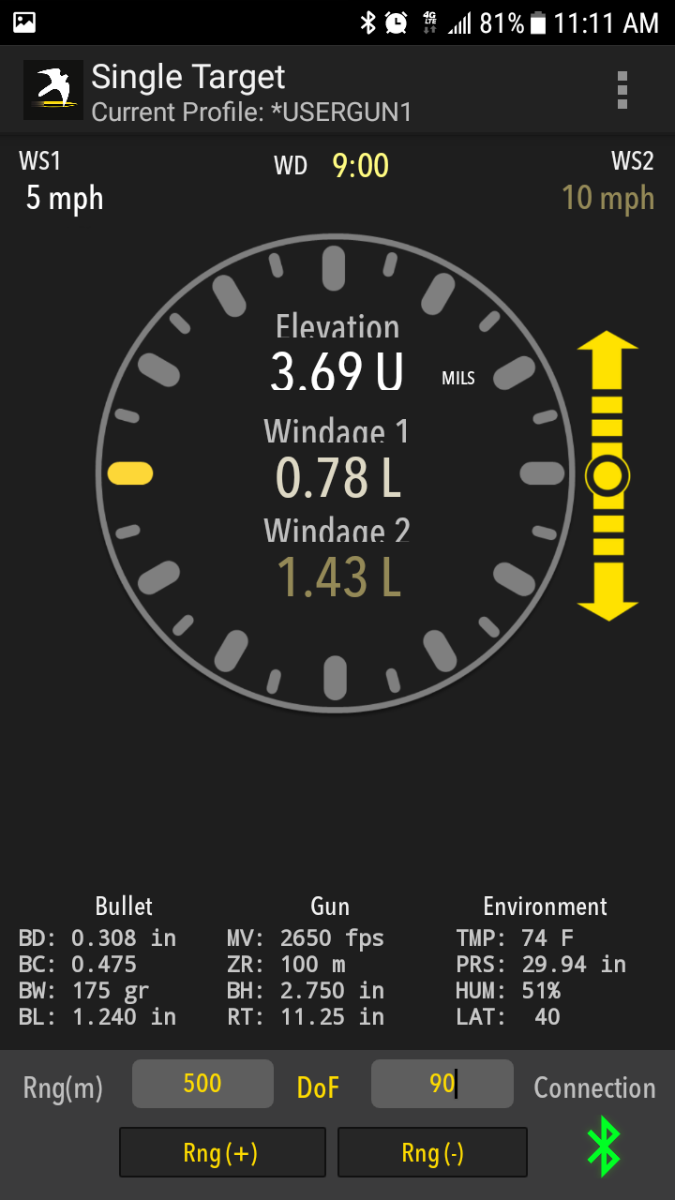
- Wirelessly adjust the target range and/or direction of fire on your Kestrel and view the resulting elevation and windage solution without ever leaving your shooting position.
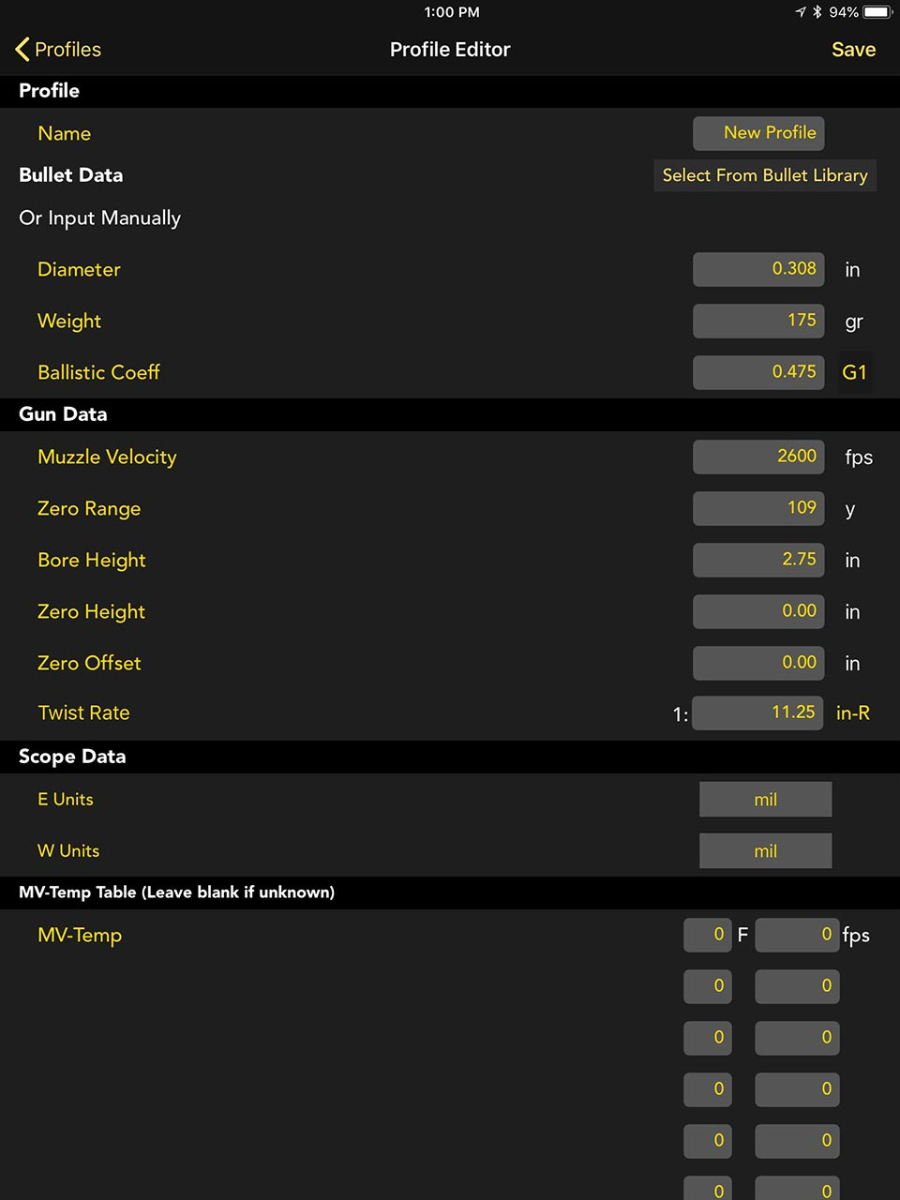
- Build and transfer custom gun/bullet profiles.
- Comprehensive Applied Ballistics bullet library provides G1/G7 ballistics coefficients, weight, diameter, and length data for over 500 bullets.
- Comprehensive Hornady Bullet Files that include the bullet's mass properties, aerodynamic moments, and Doppler Radar determined drag coefficients (Kestrel 5700 4DOF only)
- With Kestrel Elite Meters, also access and use Applied Ballistics Custom Drag Models, providing exact drag profiles for supersonic, transonic, and subsonic bullet flight for maximum accuracy at extreme long range.
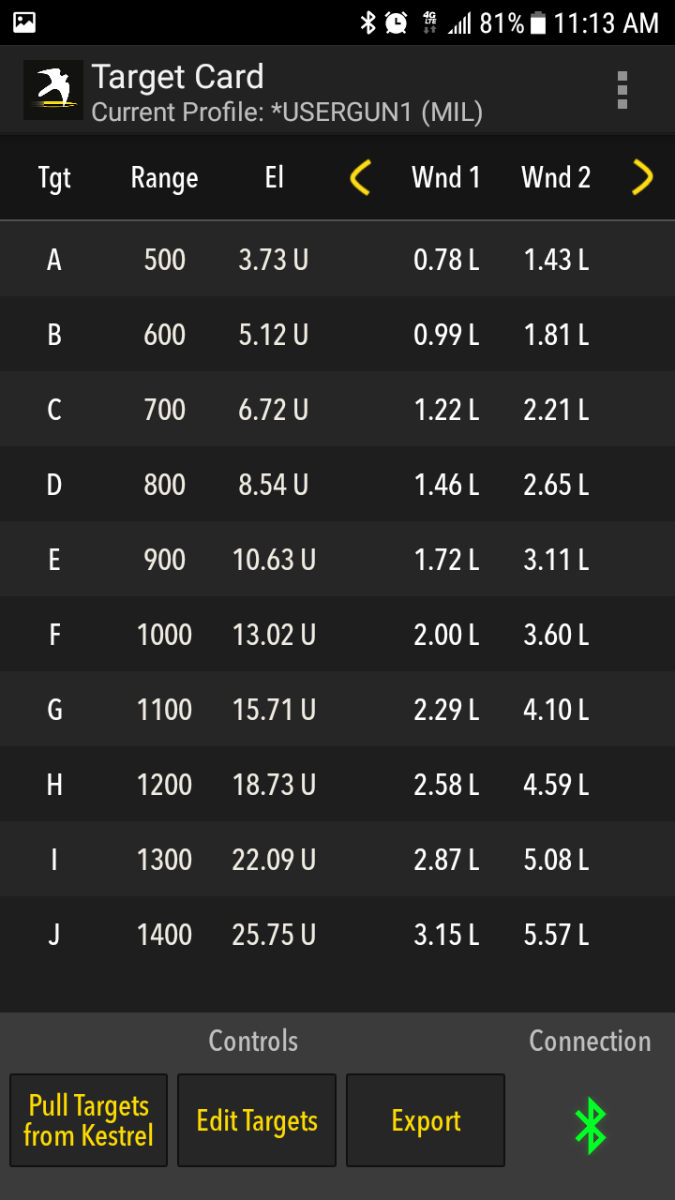
- Advanced Target Card view allows you to simultaneously view the elevation and windage solution for up to 10 targets defined by direction, range, and angle - giving you the edge at precision rifle matches (available for Kestrel Elite only).
- Export your customized target card to save or print out.
- Use your phone's compass to capture a new direction of fire, wind direction, or inclination angle and send it to the Kestrel.
Example Screen Shots

|
See elevation and windage solutions as well as wind speed and direction without leaving your shooting position. Changing Target Range and/or Direction of Fire in the app automatically updates the solution from the Kestrel remotely. |
|
Input up to 10 separate target ranges to see elevation and windage solutions for each. Perfect for competition multi-target stages. |

|
Create and manage gun and bullet profiles for easy upload to and from your Kestrel. Includes bullet data from the Applied Ballistics G1/G7 bullet library. |
Kestrel Firmware:
Support Documents for all Kestrels
Device Compatibility:
- Firmware: iOS versions 10.0 and higher.
- Hardware: iPhone 4s onward, iPad 3rd generation onward, iPod Touch 5th generation onward.
Kestrel Compatibility:
- Kestrel Sportsman Weather Meter with Applied Ballistics with LiNK
- Kestrel 5700 Ballistics Weather Meter with LiNK
- Kestrel 5700 Elite Weather Meter with Applied Ballistics with LiNK
- Kestrel 5700 Ballistics Weather Meter with Hornady 4DOF
- Kestrel 2700 Ballistics Weather Meter
The free Kestrel LiNK Ballistics app is the perfect companion to the Kestrel Sportsman, Kestrel 5700 Ballistics Weather Meter, Kestrel 5700 Elite Weather Meter with Applied Ballistics, Kestrel 5700 Ballistics Weather Meter with Hornady 4DOF, or Kestrel 2700 Ballistics Weather Meter. Build and manage your gun/bullet profiles and download them to your Kestrel Ballistics Meter before you set out. At the range or match, secure your Kestrel Ballistics Meter to a tripod using the optional Kestrel Vane Mount and use the LiNK Ballistics app to quickly adjust the target range and direction of fire and view the shooting solution and wind rose without leaving your shooting position. It’s like having a meteorologist and ballistician standing next to you while you shoot.
Download Kestrel LiNK Ballistics for Android:
LiNK (Kestrel)
Quick Look
- Wirelessly adjust the target range and/or direction of fire on your Kestrel and view resulting elevation and windage solution without ever leaving your shooting position.
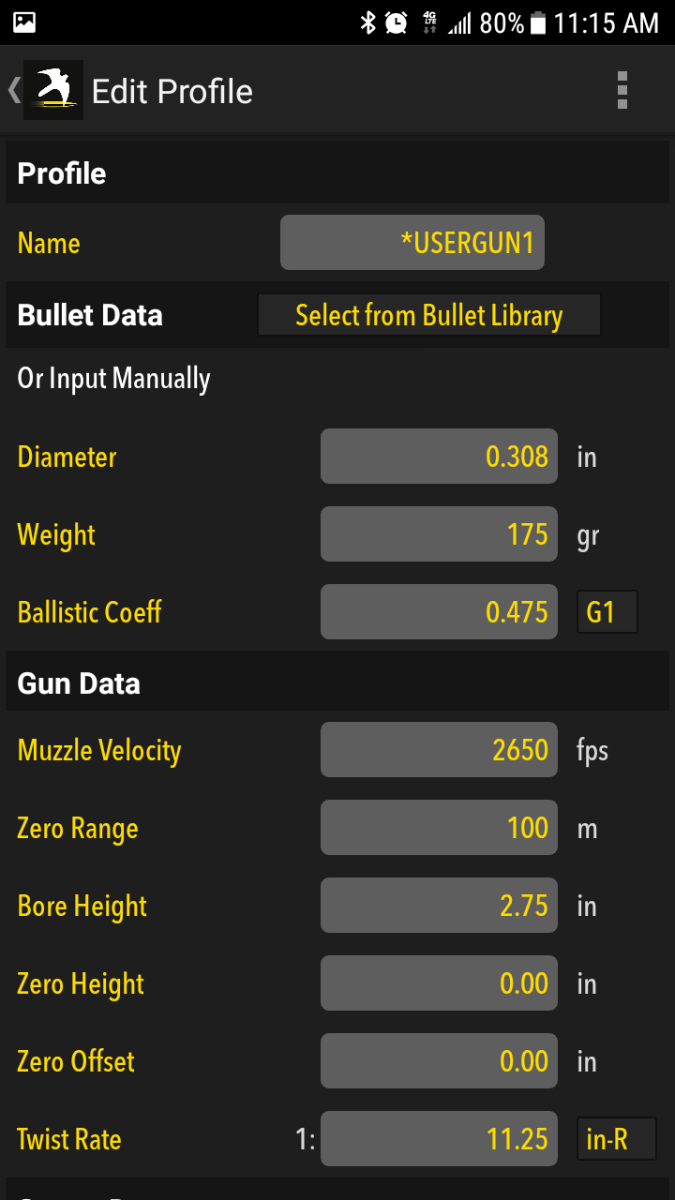
- Build and transfer custom gun/bullet profiles.
- Comprehensive Applied Ballistics bullet library provides G1/G7 ballistics coefficients, weight, diameter and length data for over 500 bullets.
- Comprehensive Hornady Bullet Files that includes the bullet's mass properties, aerodynamic moments and Doppler Radar determined drag coefficients (Kestrel 5700 4DOF only)
- With Kestrel Elite Meters, also access and use Applied Ballistics Custom Drag Models, providing exact drag profiles for supersonic, transonic, and subsonic bullet flight for maximum accuracy at extreme long range.
- Advanced Target Card view allows you to simultaneously view the elevation and windage solution for up to 10 targets defined by direction, range and angle - giving you the edge at precision rifle matches (available for Kestrel Elite only).
- Export your customized target card to save or print out.
- Use your phone's compass to capture a new direction or fire, wind direction, or inclination angle and send to the Kestrel.
Example Screen Shots
|
See elevation and windage solutions as well as wind speed and direction without leaving your shooting position. Changing Target Range and/or Direction of Fire in the app automatically updates the solution from the Kestrel remotely. |
|
Input up to 10 separate target ranges to see elevation and windage solutions for each. Perfect for competition multi-target stages. |
|
Create and manage gun and bullet profiles for easy upload to and from your Kestrel. Includes bullet data from the Applied Ballistics G1/G7 bullet library. |
Kestrel Firmware:
Support Documents for all Kestrels
Device Compatibility:
- Firmware: Android 5.0 and higher.
- Hardware: Most Android Devices with Bluetooth Smart®, including Samsung Galaxy, Nexus 4, Motorola Droid and other recent generation phones and tablets.
Kestrel Compatibility:
- Kestrel Sportsman Weather Meter with Applied Ballistics with LiNK
- Kestrel 5700 Ballistics Weather Meter with LiNK
- Kestrel 5700 Elite Weather Meter with Applied Ballistics with LiNK
- Kestrel 5700 Ballistics Weather Meter with Hornady 4DOF
- Kestrel 2700 Ballistics Weather Meter
Please see the attached guidance with Exporting Issues with LiNK iOS.
... PermalinkPlease check out our Kestrel 5000 Firmware change log to view the differences in the various firmware versions: Firmware Change Log
... PermalinkYou cannot upgrade the 5700 Elite as it doesn't have the processing power to run the analysis. You can upgrade your 5700X to include WEZ for $100. Please connect your unit to the Kestrel LiNK Ballistics app and you will see a pop up. Follow the prompts in the app to upgrade it.
... Permalink