


Kestrel 5700 Elite Weather Meter with Applied Ballistics and LiNK
Get the world's most complete ballistics calculator -- a rugged Kestrel Weather Meter with the "science of accuracy" built-in! Get accurate measurement of wind and air density to deliver elevation and windage solutions for unprecedented accuracy on extended long-range shots.

- Employs the Applied Ballistics bullet library of custom drag models, an exact measurement of your bullet’s drag profile plus corrections for Aerodynamic Jump, Spin Drift, Coriolis, and Drop Scale Factoring to achieve accurate extended long-range shots.
- Expanded features include a customizable Target Card and an expanded Ballistics Data Table, as well as storage for up to 30 gun and bullet profiles and 10 saved targets.
- Weather mode offers the full environmental measurements, storage and charting capabilities of the Kestrel 5500 Weather Meter, including wind speed, direction, crosswind, temperature, humidity, pressure and altitude.
- LiNK connectivity powered by Bluetooth® low energy provides wireless communication to mobile devices and computers and integration with LiNK compatible laser range finders for improved speed and accuracy. (Note: LiNK Dongle sold seperately)
- Kestrel LiNK for Ballistics app on Android and iOS provides full gun management as well as access to the Applied Ballistics library of custom drag models for transfer to the Kestrel.
- Large, hi-res, hi-contrast, graphic display is perfectly readable in the brightest sunlight. Includes both bright white and night-vision-preserving red backlight.
- Choice of solution units (Mils, true MOA, Shooter’s MOA, or clicks) - works with any gun or targeting scope.
- Rugged (drop tested to MIL-STD-810G standards), waterproof (sealed to IP67 standards).
Kestrel 5700 Elite Weather Meter with Applied Ballistics and LiNK Overview
| Environmental Measures | |
|---|---|
 | Altitude (Barometric) |
 | Barometric Pressure |
 | Crosswind |
 | Density Altitude |
 | Dew Point Temperature |
 | Headwind/Tailwind |
 | Heat Stress Index |
 | Relative Humidity |
 | Station Pressure (Absolute Pressure) |
 | Temperature |
 | Wet Bulb Temperature (Psychrometric) |
 | Wind Chill |
 | Wind Direction |
 | Wind Speed/Air Speed |
| Tips For Taking Accurate Measurements | |
The Kestrel 5700 Elite Weather Meter with Applied Ballistics takes the guesswork out of long-range shooting, even out to the transonic and subsonic flight range of your bullet.
The Kestrel 5 Series platform offers a large, high-resolution and contrast display with ease of font readability. It also includes a built-in dual color backlight, extra-strong polycarbonate lens, AA battery operation and optional LiNK iOS and Android wireless connectivity and app support. Like all Kestrel meters, the Kestrel 5700 Elite is drop-proof, dust-proof, waterproof and able to withstand harsh environments without damage – so it can accompany you to the range, hunt, match, deployment or engagement for years to come. A range of carry pouch options makes it even easier to take your Kestrel meter with you.
Buy the Kestrel 5700 Elite with LiNK and get the power of the free Kestrel LiNK Ballistics app. Build and manage your gun/bullet profiles and download them to your Kestrel 5700 Elite before you set out. Choose from the extensive Litz library of custom bullet drag models for the most precise transonic and subsonic range solutions available anywhere. At the range or match, secure your Kestrel 5700 Elite to a tripod using the optional Kestrel Vane Mount and use the app to quickly adjust the target range and view the shooting solution and wind rose without leaving your shooting position. The LiNK Ballistics app even lets you set up multiple targets for single-screen viewing – just about an unfair advantage! It’s like having a meteorologist and ballistician standing next to you while you shoot.
LiNK enabled units can also be wirelessly paired with LiNK compatible laser rangefinders to seamlessly integrate target data into the ballistic solution for unparalleled speed and accuracy.
In addition to the ballistics solver capabilities, the Kestrel 5700 Elite is a comprehensive weather meter for measurement and logging of primary environmental conditions, including wind speed and direction, temperature, humidity, heat index, pressure and altitude. Paired with the Vane Mount, the Kestrel 5700 Elite becomes a compact, easily-deployable weather station. Your data log can be transferred to an iOS/Android device wirelessly with the LiNK wireless communication and the Kestrel LiNK app, or to a Windows/Mac device with either the wireless USB Kestrel LiNK Dongle or waterproof USB Data Transfer Cable (Both sold separately).
Kestrels have been put to the test in some of the harshest conditions on the planet. U.S. Special Forces, combat weather teams, wildland firefighters, smoke jumpers, Mt. Everest expeditions and auto pit crews are just a few who rely on a Kestrel to provide them with the crucial environmental data they need. Watch any on-screen meteorologist during a hurricane, and you’re sure to spot a Kestrel in action. With a Kestrel 5700 Elite, you can put accurate shooting solutions and environmental measurements in the palm of your hand, anywhere your adventure takes you.
Video Series for Getting started with a Kestrel Ballistics Meter
To purchase a 5700 Elite unit without LiNK Bluetooth connectivity, please call us at 1-800-784-4221.
Engraving Note: Please make sure that everything is spelled correctly, as your engraved product cannot be returned. All sales are final on engraved products. Add 2 business days to all engraving orders.
Which Kestrel Ballistics Meter is for you?
- Military Weather & Environmental Monitoring
- Precision & Competitive Shooting
- Shooting
- Backlight - Switchable White/Red
- Ballistics Calculator - Applied Ballistics®
- Battery Life Indicator
- Data Log Graph View
- Data Logging - Adjustable Interval
- Date & Time
- Digital Compass
- Drop-Tested to MIL-STD-810G
- FREE Kestrel LiNK Apps for Windows & Mac*
- FREE Kestrel LiNK Software for iOS and Android*
- High Contrast, Sunlight Readable Monochrome LCD Display
- Integrated Flip Open Impeller Cover
- LiNK Wireless Communication to Mobile Devices (Bluetooth low energy)*
- Multilingual Menus (English, French, Spanish, German)
- Minimum/Maximum/Average Reading
- Pressure Sensor
- Relative Humidity Sensor
- Temperature Sensor (Patented External Isolated)
- Waterproof to IP67 (3'/1M for 30 minutes)
- Advanced Ballistics Data table
- Aerodynamic Jump Correction
- Applied Ballistics Custom Drag Models
- Average and Peak Wind Correction
- *Connect with LiNK Compatible Range Finders
- Coriolis Correction
- Create and store 10 Targets
- Create and store up to 30 Gun/Bullet Profiles
- G1/G7 Drag Models
- High Angle Shot Correction
- Integrated Applied Ballistics Calculator
- Moving Target Lead Correction
- Muzzle Velocity Calibration
- MV-Temp Table
- Range Card
- Spin Drift Correction
- Supports Mil, MOA, Clicks
- Subsonic Range Drop Scale Factor Calibration
- Standard and Night Vision Preserving Backlight
- Target Range Estimator
- Zero Offset
* Applies to LiNK models only
- Battery - 1 x AA
- Certificate Of Conformity (Spec Sheet)
- Instructions
- Lanyard
- Protective Drawstring Pouch
The specs on this page relate to all Kestrel 5 series meters. Just because a measurement is listed in this chart does not necessarily mean that it is included with all meters. To see a listing of all measurements and features for this meter, please click on the In-Depth tab above.
| SENSORS | ||||
|---|---|---|---|---|
| SENSORS | ACCURACY | RESOLUTION | SPECIFICATION RANGE | NOTES |
| Wind Speed | Air Speed | Larger of 3% of reading, least significant digit or 20 ft/min Speed |
0.1 m/s 1 ft/min 0.1 km/h 0.1 mph 0.1 knots 1 B* 0.1 F/S* |
0.6 to 40.0 m/s 118 to 7,874 ft/min 2.2 to 144.0 km/h 1.3 to 89.5 mph 1.2 to 77.8 knots 0 to 12 B* 2-131.2* |
1 inch|25 mm diameter impeller with precision axle and low-friction Zytel® bearings. Startup speed stated as lower limit, readings may be taken down to 0.4 m/s |79 ft min|1.5 km/h |.9 mph |.8 kt after impeller startup. Off-axis accuracy -1% @ 5º off axis; -2% @ 10º; -3% @ 15º. Calibration drift < 1% after 100 hours use at 16 MPH|7 m/s. Replacement impeller (NK PN-0801) field installs without tools (US Patent 5,783,753). Wind speed calibration and testing should be done with triangle on impeller located at the top front face of the Kestrel. Measuring wind speeds above 60 m/s / 134.2 mph can damage the impeller |
| Ambient Temperature |
0.9 °F 0.5 °C |
0.1 °F 0.1 °C |
-20.0 to 158.0 °F -29.0 to 70.0 °C |
Airflow of 2.2 mph|1 m/s or greater provides fastest response and reduction of insolation effect. For greatest accuracy, avoid direct sunlight on the temperature sensor and prolonged sunlight exposure to the unit in low airflow conditions. Calibration drift is negligible for the life of the product. For further details, see Display & Battery Operational Temperature Limits. |
| Relative Humidity | 2%RH | 0.1 %RH | 10 to 90% 25°C noncondensing | To achieve stated accuracy, unit must be permitted to equilibrate to external temperature when exposed to large, rapid temperature changes and be kept out of direct sunlight. Calibration drift is typically less than ±0.25% per year. |
| Pressure |
1.5 hPa|mbar 0.044 inHg 0.022 PSI |
0.1 hPa|mbar 0.01 inHg 0.01 PSI |
25°C/77°F 700-1100 hPa|mbar 20.67-32.48 inHg 10.15-15.95 PSI |
Monolithic silicon piezo-resistive pressure sensor with second-order temperature correction. Between 1100–1600 mbar, unit will operate with reduced accuracy. Sensor may not operate above 1600 mbar and can be damaged above 6,000 mbar or below 10 mbar. Calibration drift is negligible for the life of the product. |
| Compass | 5° |
1° 1/16th Cardinal Scale |
0 to 360° | 2-axis solid-state magneto-resistive sensor mounted perpendicular to unit plane. Accuracy of sensor dependent upon unit’s vertical position. Self-calibration routine eliminates magnetic error from batteries or unit and must be run after every full power- down (battery removal or change). Readout indicates direction to which the back of the unit is pointed when held in a vertical orientation. Declination/variation adjustable for True North readout. |
| CALCULATED MEASUREMENTS | |||
|---|---|---|---|
| MEASUREMENT | ACCURACY (+/-) | RESOLUTION | SENSORS EMPLOYED |
| Air Density |
0.0002 lb/ft3 0.0033 kg/m |
0.001 lbs/ft3 0.001 kg/m3 |
Temperature, Relative Humidity Pressure |
| Air Flow | 6.71% |
1 cfm 1 m3/hr 1 m3/m 0.1m3/s 1 L/s |
Air Speed, User Input (Duct Shape & Size) |
| Altitude |
typical: 23.6 ft/7.2 m from 750 to 1100 mBar max: 48.2 ft/14.7 m from 300 to 750 mBar |
1 ft 1 m | Pressure, User Input (Reference Pressure) |
| Barometric Pressure |
0.07 inHg 2.4 hPa|mbar 0.03 PSI |
0.01 inHg 0.1 hPa|mbar 0.01 PSI |
Pressure, User Input (Reference Altitude) |
| Crosswind & Headwind/Tailwind | 7.1% |
1 mph 1 ft/min 0.1 km/h 0.1 m/s 0.1 knots |
Wind Speed, Compass |
| Delta T |
3.2 °F 1.8 °C |
0.1 °F 0.1 °C | Temperature, Relative Humidity Pressure |
| Density Altitude |
226 ft 69 m |
1 ft 1 m | Temperature, Relative Humidity Pressure |
| Dew Point |
3.4 °F 1.9 °C 15- 95% RH. Refer to Range for Temperature Sensor |
0.1 °F 0.1 °C |
Temperature, Relative Humidity |
| Evaporation Rate |
0.01 lb/ft2/hr 0.06 kg/m2/hr |
0.01 b/ft2/hr 0.01 kg/m2/hr |
Wind Speed, Temperature Relative Humidity Pressure, User Input (Concrete Temperature) |
| Heat Index |
7.1°F 4.0°C |
0.1 °F 0.1 °C |
Temperature, Relative Humidity |
| Moisture Content | Humidity Ratio (“Grains”) |
4.9gpp .7g/kg |
0.1 gpp 0.01 g/kg |
Temperature, Relative Humidity Pressure |
| Probability of Ignition (PIG) | PIG Accuracy dependent on proximity of inputs to reference table steps. | 10% | Temperature, Relative Humidity |
| THI (NRC) |
1.5 °F 0.8 °C |
0.1 °F 0.1 °C |
Temperature, Relative Humidity |
| THI (Yousef) |
2.3 °F 1.3 °C |
0.1 °F 0.1 °C |
Temperature, Relative Humidity |
| Relative Air Density | .0.3% | 0.1% | Temperature, Relative Humidity Pressure |
| Wet Bulb Temperature - Psychrometric |
3.2 °F 1.8 °C |
0.1 °F 0.1 °C |
Temperature, Relative Humidity Pressure |
| Wet Bulb Temperature - Naturally Aspirated (NWB TEMP) |
1.4 °F 0.8 °C |
0.1 °F 0.1 °C |
Wind Speed, Temperature Globe Temperature, Relative Humidity, Pressure |
| Wind Chill |
1.6 °F 0.9 °C |
0.1 °F 0.1 °C |
Wind Speed, Temperature |
| ADDITIONAL PRODUCT INFO | |
|---|---|
| Display & Backlight | Multifunction, multidigit monochrome dot-matrix display. Choice of white or red LED backlight. |
| Response Time & Display Update | Display updates every 1 second. After exposure to large environmental changes, all sensors require an equilibration period to reach stated accuracy. Measurements employing RH may require longer periods particularly after prolonged exposure to very high or very low humidity. WBGT requires about 8 minutes to reach 95% accuracy and about 15 minutes to reach 99% accuracy after exposure to large environmental changes. |
| Data Storage & Graphical display Min/Max/Avg History | Logged history stored and displayed for every measured value. Manual and auto data storage. Min/Max/Avg history may be reset independently. Auto-store interval settable from 2 seconds to 12 hours*, overwrite on or off. Logs even when display off except for 2 and 5 second intervals. Kestrel 5 series units hold over 10,000 data points. |
| data Upload & Bluetooth Data Connect Option | Wireless range up to 100ft. Connection requires optional USB data transfer cable or Kestrel Link Dongle or Kestrel LiNK app. Employs Kestrel Link protocol for data transmission with Link supported devices. (Kestrel LiNK for iOS/Android, Kestrel Link for PC/MAC). |
| Clock/Calendar | Real-time hours:minutes:seconds clock, calendar, automatic leap-year adjustment. |
| Auto Shutdown | User-selectable – Off, 15-60 minutes with no key presses. |
| Languages | English, French, German, Spanish. |
| Certifications | CE certified, RoHS, FCC, IC tested and WEEE compliant. Individually tested to NIST-traceable standards. |
| Origin | Designed and manufactured in the USA from US and imported components. Complies with Regional Value Content and Tariff Code Transformation requirements for NAFTA Preference Criterion B. |
| Battery Life | AA Lithium included. Up to 400 hours of use, reduced by backlight, alert light and buzzer, or Bluetooth radio transmission use. |
| Shock Resistance | MIL-STD-810g, Transit Shock, Method 516.6 Procedure IV; unit only; impact may damage replaceable impeller. |
| Sealing | Waterproof (IP67 and NEMA-6) |
| Display & Battery Operational Temperature Limits | 14° F to 131° F | -10 °C to 55 °C Measurements may be taken beyond the limits of the operational temperature range of the display and batteries by maintaining the unit within the operational range and then exposing it to the more extreme environment for the minimum time necessary to take reading. |
| Storage Temperature | -22.0 °F to 140.0 °F | -30.0 °C to 60.0 °C. |
| Size & Weight | 5.0 x 1.9 x 1.1 in | 12.7 x 4.5 x 2.8 cm, 4.3 oz | 121 g. (Lithium battery included) |
Models & SKUs:
- Kestrel 5700 Elite Weather Meter with Applied Ballistics (Black): 0857ABLK
- Kestrel 5700 Elite Weather Meter with Applied Ballistics (Olive): 0857AOLV
- Kestrel 5700 Elite Weather Meter with Applied Ballistics (Tan): 0857ATAN
- Kestrel 5700 Elite Weather Meter with Applied Ballistics (Blaze Orange): 0857ABLZ
- Kestrel 5700 Elite Weather Meter with Applied Ballistics and LiNK (Blaze Orange): 0857ALBLZ
- Kestrel 5700 Elite Weather Meter with Applied Ballistics and LiNK (Black): 0857ALBLK
- Kestrel 5700 Elite Weather Meter with Applied Ballistics and LiNK (Olive): 0857ALOLV
- Kestrel 5700 Elite Weather Meter with Applied Ballistics and LiNK (Tan): 0857ALTAN
Kestrel Ballistics 5 Series Instruction Manuals
 How to Get Started with your Kestrel Ballistics Unit
(Size: 184.7 KB)
User Guide Kestrel 5700 Ballistics Weather Meter and Kestrel 5700/5700X Elite Weather Meters with Applied Ballistics (Also 5700 Sportsman Instructions)
(Size: 795.1 KB)
How to Get Started with your Kestrel Ballistics Unit
(Size: 184.7 KB)
User Guide Kestrel 5700 Ballistics Weather Meter and Kestrel 5700/5700X Elite Weather Meters with Applied Ballistics (Also 5700 Sportsman Instructions)
(Size: 795.1 KB)
Support Documents for all Kestrels
 Applied Ballistics Profile Loader - Version 083
(Size: 6.4 MB)
Applied Ballistics Profile Loader - Version 083
(Size: 6.4 MB)
Kestrel Ballistics 5 Series Downloads
Chart of Accuracies for Bullet Trajectory
(Size: 321.6 KB)
Using WEZ Analysis to Increase Long-range P(hit)
(Size: 415.2 KB)
Where does Wind Matter?
(Size: 376.4 KB)
Kestrel 5 Series Troubleshooting Documents
Kestrel Ballistics 5 Series Troubleshooting Documents
How can I submit a tax-exempt order using the website?
(Size: 915.2 KB)
How to navigate to all the menu options in the Kestrel 5700 Elite.
(Size: 1017.3 KB)
How to Update your Firmware LiNK Ballistics for iOS
(Size: 706 KB)
Kestrel 5700 Elite Button Diagram / Navigation Tree
(Size: 222.6 KB)
Kestrel 5 Series Downloads
How to I determine the average wind direction?
(Size: 837 KB)
Kestrel Firmware Update Files for OSX
(Size: 14 MB)
LiNK (Kestrel)
Product Questions
Make sure Bluetooth® is turned ON on your phone. On the Kestrel, go to the Main Menu->Bluetooth and turn it ON. Press the center button while Bluetooth is highlighted and check to ensure that Conct is set to PC/Mobile and it shows Available. Next go to the application that you are connecting with on your phone and select the Kestrel as the device you would like to connect with. Please note: if you do not find the Kestrel on your phone’s “standard” Bluetooth connection screen, that does not mean that the Kestrel is not working properly. Please first go to the application and try to connect through the application. The Kestrel should connect.
... PermalinkAll models of the Kestrel 5000 Series have optical data ports that can be seen through the openings of the battery door. A USB Data Transfer Cable can be purchased separately, which plugs directly into the back of the Kestrel and extends to a USB port in your computer. You will NOT be able to connect a non-LiNK model unit to a mobile device (e.g., any device without a USB port).
... PermalinkThese programs handle uploading the weather data from the Kestrel to a specific device. This weather data can then be exported into MS Excel. You can also update your firmware any of these programs. Visit the Kestrel LiNK Software and Apps page to learn more.
... PermalinkAs can be seen in the pictures below, place your thumb on the bottom of the unit and slide the latch from the “Locked” to the “Unlocked” position. The battery door should pop up enough that you can remove it. If you have trouble opening the battery door, some slight pressure DOWN on the battery door itself with your other thumb may help release the latch.
 ...
Permalink
...
Permalink
First slide in the tab at towards the top of the unit, then gently press the bottom part of the battery door down until it snaps into place. Ensure that the O-ring remains in place on the battery door when closing.
... PermalinkNo. Since the Kestrel 5 Series meters utilize only one AA battery, there is no need to use the battery shim to separate two AAA batteries as in the previous version.
... PermalinkYes. You can purchase an upgrade from the website and a file will be emailed to you that will allow you to remotely upgrade your unit. The upgrade needs to be done on a Windows or MacOS computer, however, customers can choose between a Bluetooth dongle and USB cable depending on preferred connection method.
You can purchase the upgrade here: Kestrel 5700 to Kestrel Elite upgrade
... PermalinkNo. Currently ONLY the Kestrel Sportsman Weather Meter with Applied Ballistics or the Kestrel 5700 Ballistics Weather Meter can be upgraded to the Kestrel 5700 Elite model.
... PermalinkAll of the Kestrel 5000 series units have the Night Vision option in addition to the standard white backlight. There is a menu selection that allows the customer to toggle between both options.
... PermalinkWind Speed – NK sells factory calibrated replacement impellers that can easily be installed by the customer. NK recommends replacing the impeller every 2-3 years depending on usage.
Humidity – The Kestrel 5 Series and DROP data loggers employ a highly accurate, calibrated, digital humidity sensor. Based on the sensor manufacturer's specifications and NK testing, drift on this sensor over time is minimal and field recalibration is likely to degrade accuracy rather than improve it. Factory calibration to validate and certify accuracy at a minimum of two RH points is available from NK. Kestrel 5000 series units can also be recalibrated in the field using our kit RH Recalibration Kit . During the five-year warranty period, NK will repair, recalibrate or replace any Kestrel 5 Series or DROP which drifts more than +/-1% RH/year since the date of manufacture.
Temperature – The thermistor in the Kestrel 5 series should not need to be recalibrated. If you think your sensor is incorrect, please contact techsupport@nkhome.com
Pressure – The pressure in the Kestrel 5 series should not need to be recalibrated. If you think your sensor is incorrect, please contact techsupport@nkhome.com
... PermalinkKestrel 5 series units with LiNK will need to use the Kestrel LiNK Wireless Dongle to connect with a computer. The Kestrel 5 series will not work with any internal Bluetooth modules. To connect, insert the Kestrel LiNK Dongle into an open USB port. On the Kestrel, go to the Main Menu->Bluetooth and turn it ON. Set Conct to "PC / Mobile." Open the application on the computer and select the Kestrel as the device to connect to. There is no more “pairing," "COM port numbers," or "PIN Codes" to worry about for those familiar with the 4000 series.
... PermalinkPlease see our graphing guide:
... PermalinkYes! The Kestrel 5 Series now has both Android and iPhone integration through our Kestrel LiNK iOS and Android Apps. Kestrel LiNK iOS and Android apps allow LiNK enabled Kestrel 5 Series Meters and DROPs to connect wirelessly with mobile devices to view real-time measurements, receive on-screen alerts, download data and perform firmware updates. The Kestrel LiNK Ballistics app, designed specifically for the the Sportsman , the Kestrel 5700 series or meters, and the Kestrel 5700 Elite meters, provides full gun management and access to the Applied Ballistics library of G1/G7 curves (Sportsman and 5700) and custom drag models (5700 Elite).
... PermalinkFor overall setting up profiles and using the Kestrel please see the following document:
Kestrel Ballistics 5 Series Instruction Manuals
How to Get Started with your Kestrel Ballistics Unit
(Size: 184.7 KB)
Any of the LiNK Ballistics applications will allow you to transfer gun profiles to your Kestrel. So Kestrel LiNK Ballistics for iOS or Kestrel LiNK Ballistics for Android will allow you to use a mobile device to transfer gun profiles but you would need to have the LiNK (i.e., Bluetooth) model. If you are using a Windows computer, you can use the Applied Ballistic Profile Loader (Version 42 or higher).
NOTE : Please be aware that currently the Applied Ballistics Profile Loader cannot be used with Bluetooth for Kestrel 5700 devices; therefore you will need to purchase the USB Transfer cable to transfer files with a Windows PC.
... PermalinkUnfortunately we do not have a ballistics application that runs on a MAC.
... PermalinkThe free Kestrel LiNK Ballistics app for Android and iOS is the ideal companion to the Kestrel 5700 Ballistics series of Weather Meters. Build and manage your gun/bullet profiles and download them to your Kestrel Ballistics unit before you set out. The app is also the perfect way to display your ballistic solutions remotely via Bluetooth. Another option is purchasing a Kestrel HUD
... PermalinkCurrently mobile devices cannot perform firmware upgrades. An upgrade is defined as going from a 5 Series Kestrel Sportsman or Kestrel 5700 to a Kestrel 5700 Elite with Applied Ballistics. To upgrade your Kestrel Sportsman or Kestrel 5700, you will need to connect to a Windows or MAC computer. More info can be found on the Kestrel Upgrade packages.
... PermalinkPlease review the list found here:
3rd Party Hardware and Software
We have created quick start guides for connecting to each of these below:
Vortex Fury 5000 AB Instructions
Vortex Fury 5000 AB Video Tutorial:
Kestrel 5 Series 3rd Party Hardware Connection Instructions
How to connect a Bushnell 1800 Nitro to a Kestrel 5700 unit
(Size: 110.2 KB)
Locked issue with Sig 5K or 10K Laser Rangefinders
(Size: 523.7 KB)
Using a Bushnell CONX with a Kestrel 5700
(Size: 538.1 KB)
Using a Leica CRF Rangemaster 3500.com with a Kestrel 5700
(Size: 104.6 KB)
Using a Leica Rangemaster 2800 with a Kestrel 5700
(Size: 104.8 KB)
Using a Sig Sauer 2400BDX or 3000BDX with a Kestrel 5700
(Size: 88 KB)
Using a Steiner M830r with a Kestrel 5700
(Size: 538.1 KB)
Using a Terrapin X with a Kestrel 5700
(Size: 2.2 MB)
Using a Vectronix PLRF25C with a Kestrel 5700
(Size: 106 KB)
Using a Wilcox RAPTAR-S with a Kestrel 5700
(Size: 423.6 KB)
 ...
...
You should always calibrate your Muzzle Velocity on the Kestrel because it accommodates for any errors. The suggested BCs are not always correct. We have seen a lot of muzzle velocity errors even with well chronographed MVs. Truing bends the algorithm to perfectly match the bullet’s flight path. Instead of hoping the prediction works, truing perfectly matches the flight path. For example, the ballistic solver expects different muzzle velocities depending on if you are using the G1 or G7 BC. However the chronograph is just measuring the actual muzzle velocity coming out of the barrel, independent of an BCs being used. Truing your Muzzle Velocity using CAL MV will always get you the proper MV to enter into the Kestrel so that your solutions are always on target.
... PermalinkThere is no need to input the tapered base into the Kestrel. If you measure scope height at the bell of the scope, the most your error will be is 1 – 2 clicks at 1000 yards. This can be offset by measuring to the center of the windage turret instead of the bell of the scope. It is more likely that the scope click errors will do more harm than this will. Here is some reading that might help: http://www.longrangehunting.com/forums/f19/applied-ballistics-faq-167008/.
... Permalink
The free Kestrel LiNK Ballistics app is the perfect companion to the Kestrel Sportsman, Kestrel 5700 Ballistics Weather Meter, Kestrel 5700 Elite Weather Meter with Applied Ballistics, Kestrel 5700 Ballistics Weather Meter with Hornady 4DOF, or Kestrel 2700 Ballistics Weather Meter. Build and manage your gun/bullet profiles and download them to your Kestrel Ballistics Meter before you set out. At the range or match, secure your Kestrel Ballistics Meter to a tripod using the optional Kestrel Vane Mount and use the LiNK Ballistics app to quickly adjust the target range and direction of fire and view the shooting solution and wind rose without leaving your shooting position. It’s like having a meteorologist and ballistician standing next to you while you shoot.
Download Kestrel LiNK Ballistics for iOS:
Quick Look
- Wirelessly adjust the target range and/or direction of fire on your Kestrel and view the resulting elevation and windage solution without ever leaving your shooting position.
- Build and transfer custom gun/bullet profiles.
- Comprehensive Applied Ballistics bullet library provides G1/G7 ballistics coefficients, weight, diameter, and length data for over 500 bullets.
- Comprehensive Hornady Bullet Files that include the bullet's mass properties, aerodynamic moments, and Doppler Radar determined drag coefficients (Kestrel 5700 4DOF only)
- With Kestrel Elite Meters, also access and use Applied Ballistics Custom Drag Models, providing exact drag profiles for supersonic, transonic, and subsonic bullet flight for maximum accuracy at extreme long range.
- Advanced Target Card view allows you to simultaneously view the elevation and windage solution for up to 10 targets defined by direction, range, and angle - giving you the edge at precision rifle matches (available for Kestrel Elite only).
- Export your customized target card to save or print out.
- Use your phone's compass to capture a new direction of fire, wind direction, or inclination angle and send it to the Kestrel.
Example Screen Shots

|
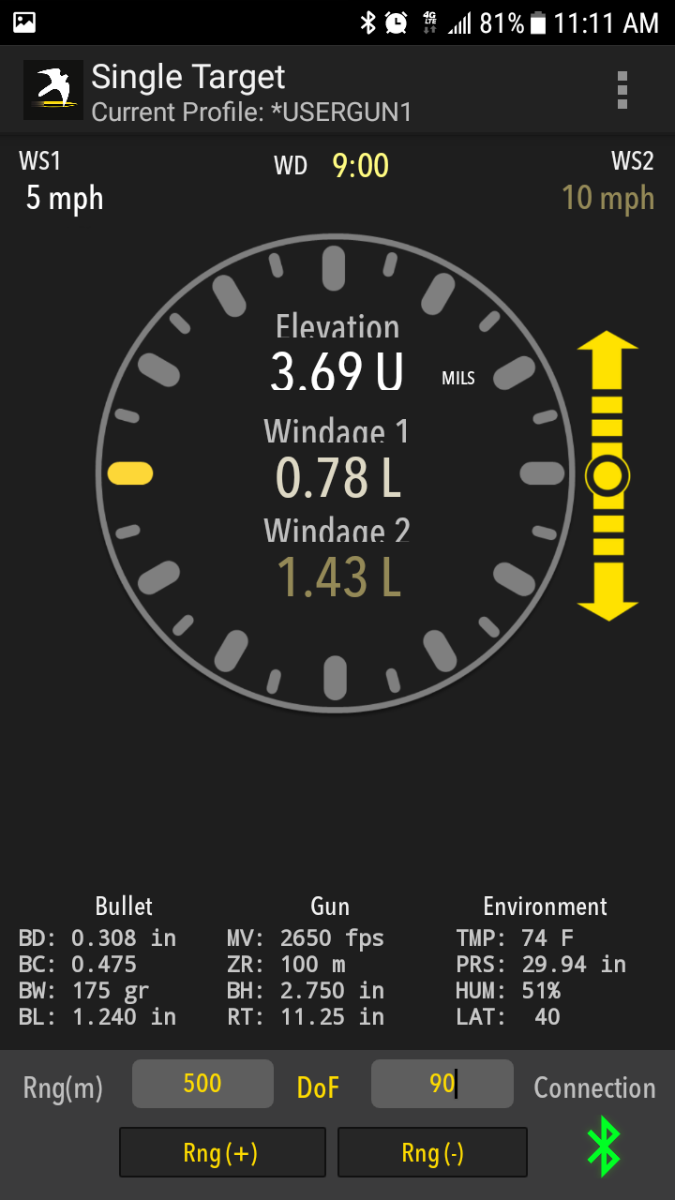
See elevation and windage solutions as well as wind speed and direction without leaving your shooting position. Changing Target Range and/or Direction of Fire in the app automatically updates the solution from the Kestrel remotely. |
|
Input up to 10 separate target ranges to see elevation and windage solutions for each. Perfect for competition multi-target stages. |

|
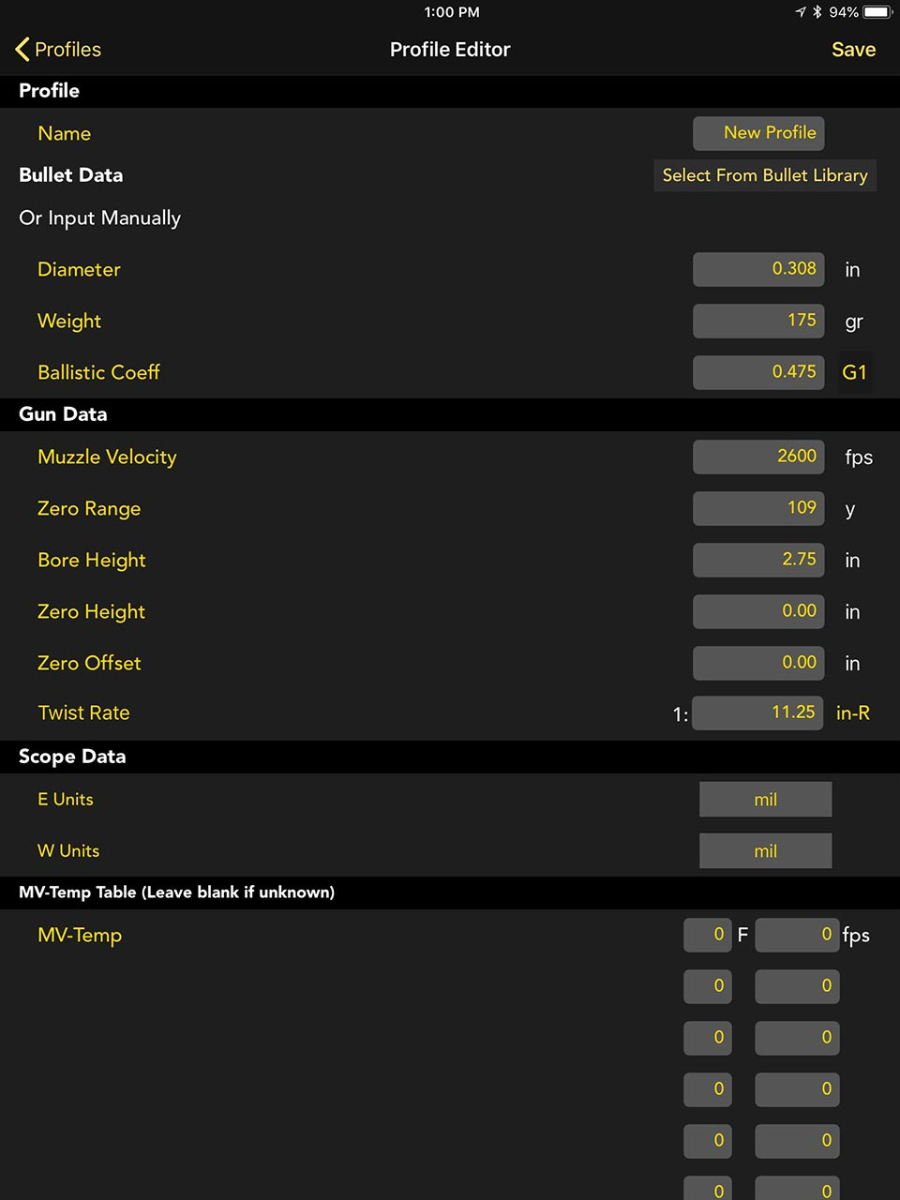
Create and manage gun and bullet profiles for easy upload to and from your Kestrel. Includes bullet data from the Applied Ballistics G1/G7 bullet library. |
Kestrel Firmware:
Support Documents for all Kestrels
Device Compatibility:
- Firmware: iOS versions 10.0 and higher.
- Hardware: iPhone 4s onward, iPad 3rd generation onward, iPod Touch 5th generation onward.
Kestrel Compatibility:
- Kestrel Sportsman Weather Meter with Applied Ballistics with LiNK
- Kestrel 5700 Ballistics Weather Meter with LiNK
- Kestrel 5700 Elite Weather Meter with Applied Ballistics with LiNK
- Kestrel 5700 Ballistics Weather Meter with Hornady 4DOF
- Kestrel 2700 Ballistics Weather Meter
The free Kestrel LiNK Ballistics app is the perfect companion to the Kestrel Sportsman, Kestrel 5700 Ballistics Weather Meter, Kestrel 5700 Elite Weather Meter with Applied Ballistics, Kestrel 5700 Ballistics Weather Meter with Hornady 4DOF, or Kestrel 2700 Ballistics Weather Meter. Build and manage your gun/bullet profiles and download them to your Kestrel Ballistics Meter before you set out. At the range or match, secure your Kestrel Ballistics Meter to a tripod using the optional Kestrel Vane Mount and use the LiNK Ballistics app to quickly adjust the target range and direction of fire and view the shooting solution and wind rose without leaving your shooting position. It’s like having a meteorologist and ballistician standing next to you while you shoot.
Download Kestrel LiNK Ballistics for Android:
Quick Look
- Wirelessly adjust the target range and/or direction of fire on your Kestrel and view resulting elevation and windage solution without ever leaving your shooting position.
- Build and transfer custom gun/bullet profiles.
- Comprehensive Applied Ballistics bullet library provides G1/G7 ballistics coefficients, weight, diameter and length data for over 500 bullets.
- Comprehensive Hornady Bullet Files that includes the bullet's mass properties, aerodynamic moments and Doppler Radar determined drag coefficients (Kestrel 5700 4DOF only)
- With Kestrel Elite Meters, also access and use Applied Ballistics Custom Drag Models, providing exact drag profiles for supersonic, transonic, and subsonic bullet flight for maximum accuracy at extreme long range.
- Advanced Target Card view allows you to simultaneously view the elevation and windage solution for up to 10 targets defined by direction, range and angle - giving you the edge at precision rifle matches (available for Kestrel Elite only).
- Export your customized target card to save or print out.
- Use your phone's compass to capture a new direction or fire, wind direction, or inclination angle and send to the Kestrel.
Example Screen Shots
|
See elevation and windage solutions as well as wind speed and direction without leaving your shooting position. Changing Target Range and/or Direction of Fire in the app automatically updates the solution from the Kestrel remotely. |
|
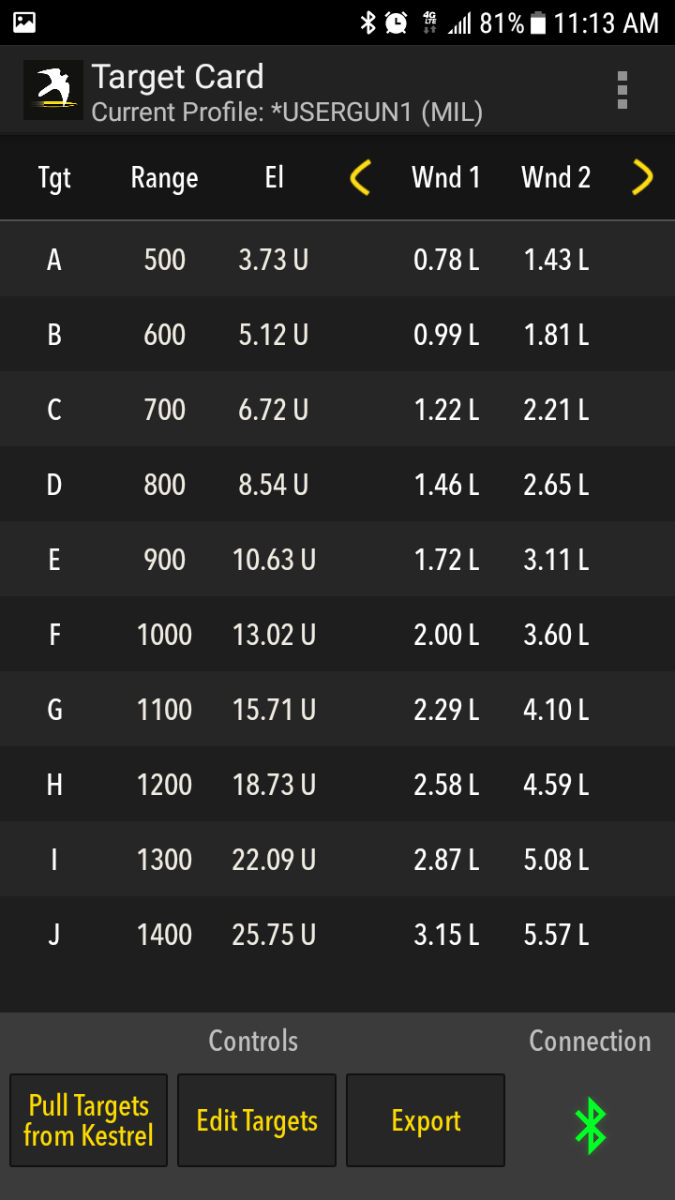
Input up to 10 separate target ranges to see elevation and windage solutions for each. Perfect for competition multi-target stages. |
|
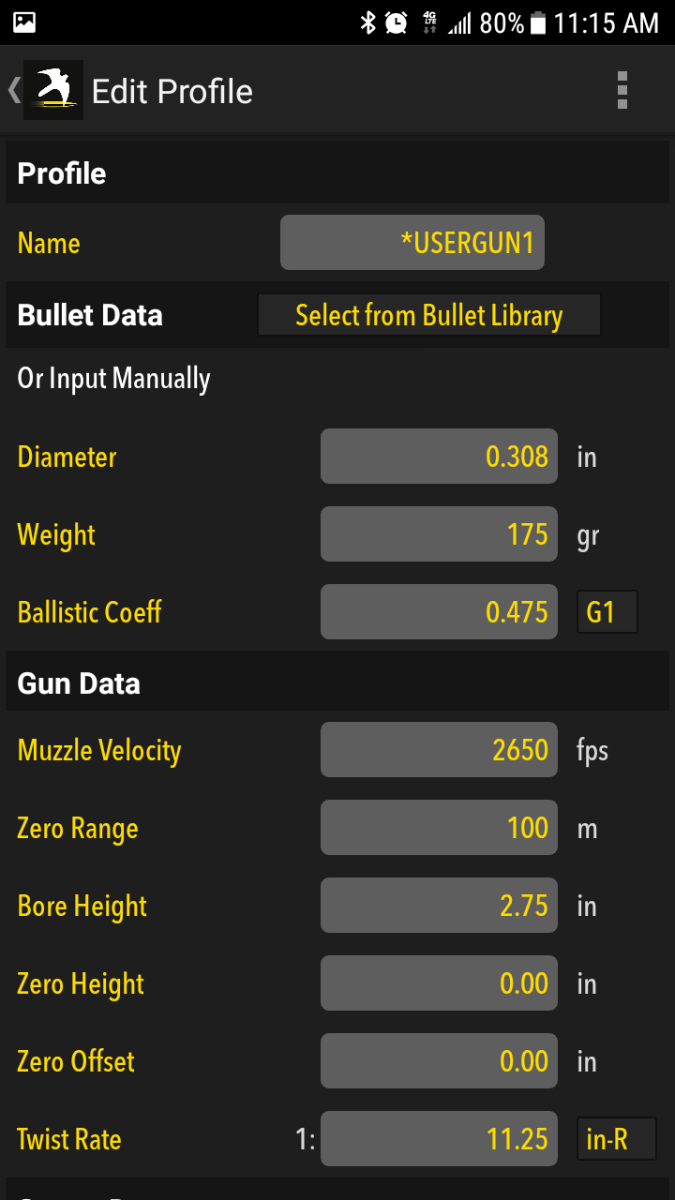
Create and manage gun and bullet profiles for easy upload to and from your Kestrel. Includes bullet data from the Applied Ballistics G1/G7 bullet library. |
Kestrel Firmware:
Support Documents for all Kestrels
Device Compatibility:
- Firmware: Android 5.0 and higher.
- Hardware: Most Android Devices with Bluetooth Smart®, including Samsung Galaxy, Nexus 4, Motorola Droid and other recent generation phones and tablets.
Kestrel Compatibility:
- Kestrel Sportsman Weather Meter with Applied Ballistics with LiNK
- Kestrel 5700 Ballistics Weather Meter with LiNK
- Kestrel 5700 Elite Weather Meter with Applied Ballistics with LiNK
- Kestrel 5700 Ballistics Weather Meter with Hornady 4DOF
- Kestrel 2700 Ballistics Weather Meter
Transfer data from your Kestrel 5 Series device and archive on your Mac computer. Data logs can be exported as csv files for viewing and analysis in spreadsheets. This software also facilitates updates and upgrades to your device firmware.
Download Kestrel LiNK for MAC:
LiNK (Kestrel)
Quick Look
- Manage updates and upgrades to device firmware
- View device information such as device name, model number, firmware version, hardware version and serial number. Rename device.
- Transfer data from your Kestrel 5 Series device wirelessly with Bluetooth dongle or with a USB cable.
- Archive data logs.
- Export data logs in csv format for viewing and analysis in spreadsheets.
Example Screen Shots
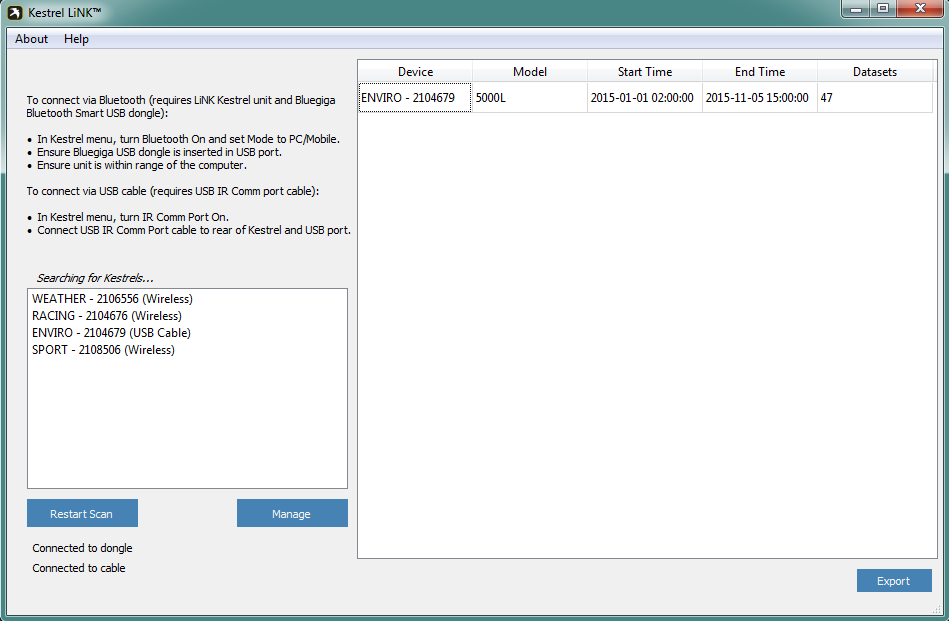
|
Easily connect your Kestrel to the application using bluetooth. |
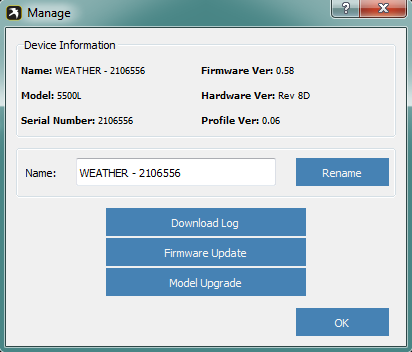
|
Manage your Kestrel: change its name, download data, and/or update your unit. |
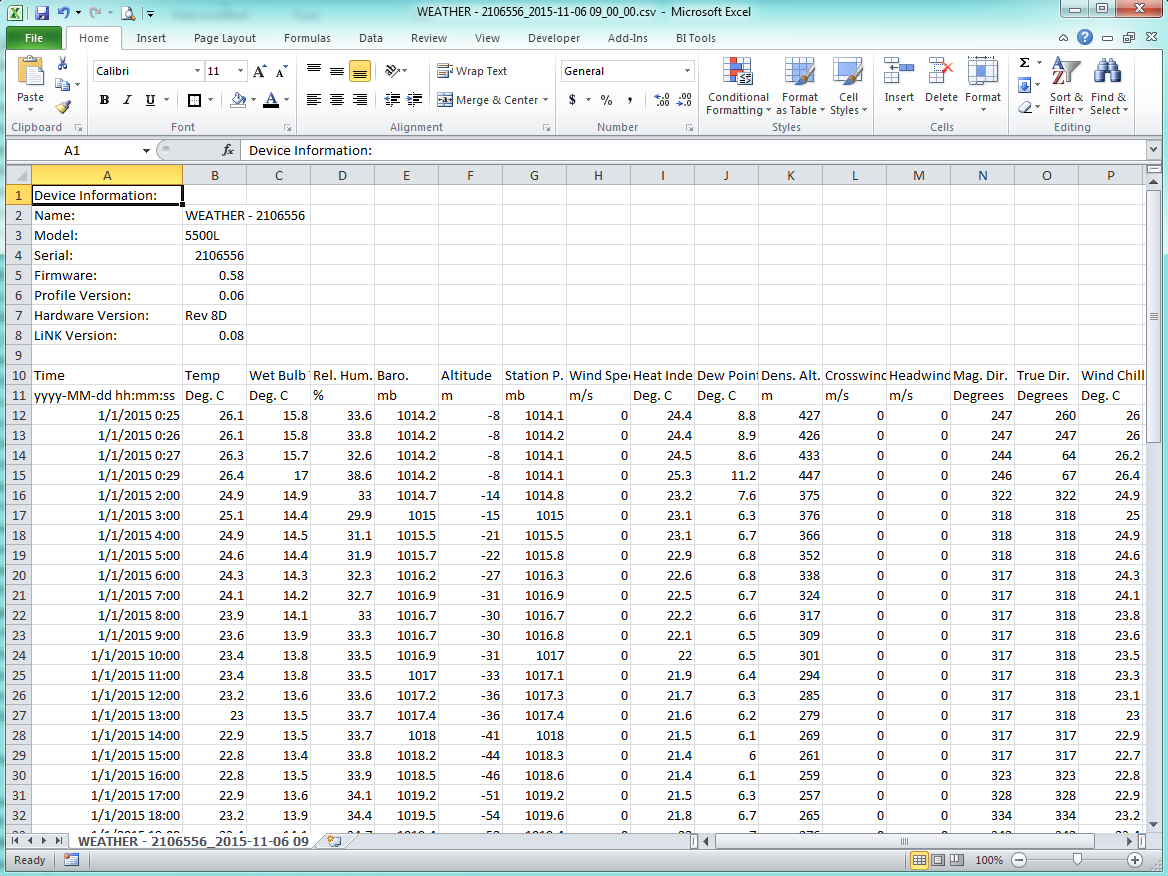
|
Export and analyze your data. |
Kestrel Firmware:
Kestrel 5 Series Troubleshooting Documents
How to Update Your Kestrel 5 Series Firmware with MAC/OSX
(Size: 821.1 KB)
Support Documents for all Kestrels
Kestrel 5 Series Downloads
 Kestrel Firmware Installer for Windows
(Size: 16 MB)
Kestrel Firmware Update Files for OSX
(Size: 14 MB)
Kestrel Firmware Installer for Windows
(Size: 16 MB)
Kestrel Firmware Update Files for OSX
(Size: 14 MB)
Device Compatibility:
- Firmware: This program is only compatible with Mac OS X 10.7 or higher.
Kestrel Compatibility:
- Kestrel 5000 Environmental Meter with LiNK
- Kestrel 5100 Racing Weather Meter with LiNK
- Kestrel 5200 Professional Weather Meter with LiNK
- Kestrel 5400 Heat Stress Tracker with LiNK
- Kestrel 5500 Weather Meter with LiNK
- Kestrel Sportsman Weather Meter with Applied Ballistics with LiNK
- Kestrel 5700 Ballistics Weather Meter with LiNK
- Kestrel 5700 Elite Weather Meter with Applied Ballistics with LiNK
Transfer data from your Kestrel 5 Series device and archive on your Windows computer. Data logs can be exported as csv files for viewing and analysis in spreadsheets. This software also facilitates updates and upgrades to your device firmware.
Download Kestrel LiNK for Windows:
LiNK (Kestrel)
Quick Look
- Manage updates and upgrades to device firmware
- View device information such as device name, model number, firmware version, hardware version and serial number. Rename device.
- Transfer data from your Kestrel 5 Series device wirelessly via the Bluetooth dongle or with a USB cable.
- Archive data logs.
- Export data logs in csv format for viewing and analysis in spreadsheets.
Example Screen Shots
| |
Easily connect your Kestrel to the application using bluetooth. |
|
Manage your Kestrel: change its name, download data, and/or update your unit. |
|
Export and analyze your data. |
Kestrel Firmware:
Kestrel 5 Series Troubleshooting Documents
How to Update Kestrel 5000 Series Firmware with Windows
(Size: 573.5 KB)
Support Documents for all Kestrels
Kestrel 5 Series Downloads
Kestrel Firmware Installer for Windows
(Size: 16 MB)
Kestrel Firmware Update Files for OSX
(Size: 14 MB)
Device Compatibility:
- Firmware: LiNK is currently compatible with Windows 7, Windows 8, and Windows 8.1 and Windows 10.
Kestrel Compatibility:
- Kestrel 5000 Environmental Meter with LiNK
- Kestrel 5100 Racing Weather Meter with LiNK
- Kestrel 5200 Professional Weather Meter with LiNK
- Kestrel 5400 Heat Stress Tracker with LiNK
- Kestrel 5500 Weather Meter with LiNK
- Kestrel Sportsman Weather Meter with Applied Ballistics with LiNK
- Kestrel 5700 Ballistics Weather Meter with LiNK
- Kestrel 5700 Elite Weather Meter with Applied Ballistics with LiNK
Bluetooth Support:
... Permalink
If you are getting NaN shown as a solution, then you have a bad value in your gun profile. For instance, the bullet length is set to 0.000. This also confirms that you have an older version of the firmware as later versions will check for these conditions before loading the gun on the unit. Check your profile and update your firmware to resolve this issue. If you are getting Bad Enviro as a solution, then there is an issue with one of the sensors. If the issue persists, then there might be a sensor failure. The best course of action is to fill out a Kestrel Service request and send it in.
... PermalinkPlease check out our Kestrel 5000 Firmware change log to view the differences in the various firmware versions: Firmware Change Log
... PermalinkTypically this will happen if the Kestrel is placed near a magnet or magnetic source. Things such as the MagnetoSpeed Riflekuhl or other chamber chillers, electronic hearing protection, or maybe even magnetic buttons on your pocket. Any magnet can affect the compass calibration. Also storing the Kestrel in a metallic enclosure such as a gun safe can have an affect on the compass calibration.
... PermalinkThis document will show the details of what the Maximum Point Blank Range function does in the Kestrel 5700 Elite (fw version 1.35 or later, Elite ONLY)
What is Maximum Point Blank Range?
(Size: 287.4 KB)
No. You can only pair the Kestrel to the Kestrel LiNK Ballistics app as a one-to-one connection. You can connect to a laser rangefinder and the Kestrel HUD simultaneously however.
... PermalinkYou will need to update your Kestrel firmware version to 1.35 (or higher) in order to use the HUD. You can update your Kestrel firmware through the Kestrel LiNK Ballistics for Android or iOS apps
... PermalinkPlease see our guidance in this tutorial on Accy 1st features:
Make sure on the Kestrel you go into Environment and set Wcap to All Targets instead of One Target
... PermalinkPlease try this as a workaround:
Here's a video that shows how to calibrate the compass and has some troubleshooting tips as well: Compass Calibration ... Permalink
Please see the guidance shown here:
How to not show all 10 targets on the Kestrel HUD?
(Size: 80.7 KB)
-
 Didn't Get What You Wanted for Christmas? Check Out Some of Our Favorite Things
-
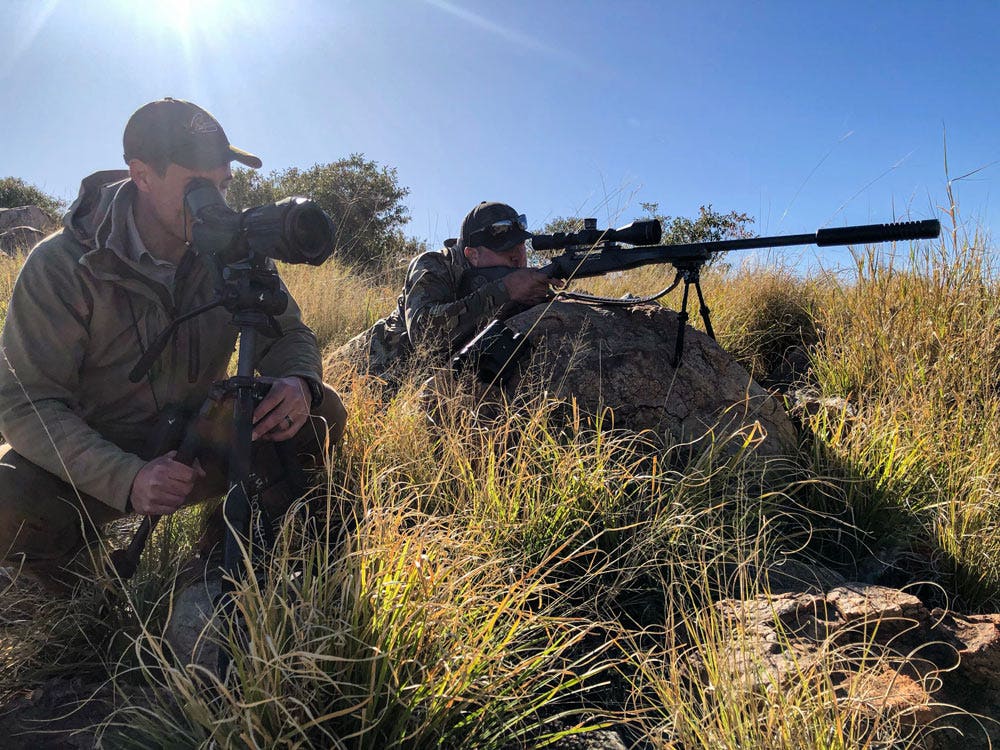 Long-Range Tips and Making the Most of Your Hunt with Kestrel Ballistics
-
 Interview with the 2019 King of 2 Miles
In this article, we hear from the reigning champion of King of 2 Miles, Paul Phillips, captain of Team Global Precision Group (GPG). Some of the best ELR shooters in the world come to compete every year for the chance to earn the KO2M title. Here Paul shares what it's all about and what the match experience was like.
Interview with the 2019 King of 2 Miles
In this article, we hear from the reigning champion of King of 2 Miles, Paul Phillips, captain of Team Global Precision Group (GPG). Some of the best ELR shooters in the world come to compete every year for the chance to earn the KO2M title. Here Paul shares what it's all about and what the match experience was like. -
 Precision Dragon Elite Youth Shooting Team
Kevin Taylor shares how the Precision Dragon Elite Youth Team in Tennessee Got its Start in PRS
Competitive Shooting can offer junior shooters the opportunity to learn new skills, take on challenging situations, build confidence, and demonstrate responsibility and teamwork. Plus, it gets them off their phones and into the great outdoors!
Precision Dragon Elite Youth Shooting Team
Kevin Taylor shares how the Precision Dragon Elite Youth Team in Tennessee Got its Start in PRS
Competitive Shooting can offer junior shooters the opportunity to learn new skills, take on challenging situations, build confidence, and demonstrate responsibility and teamwork. Plus, it gets them off their phones and into the great outdoors! -
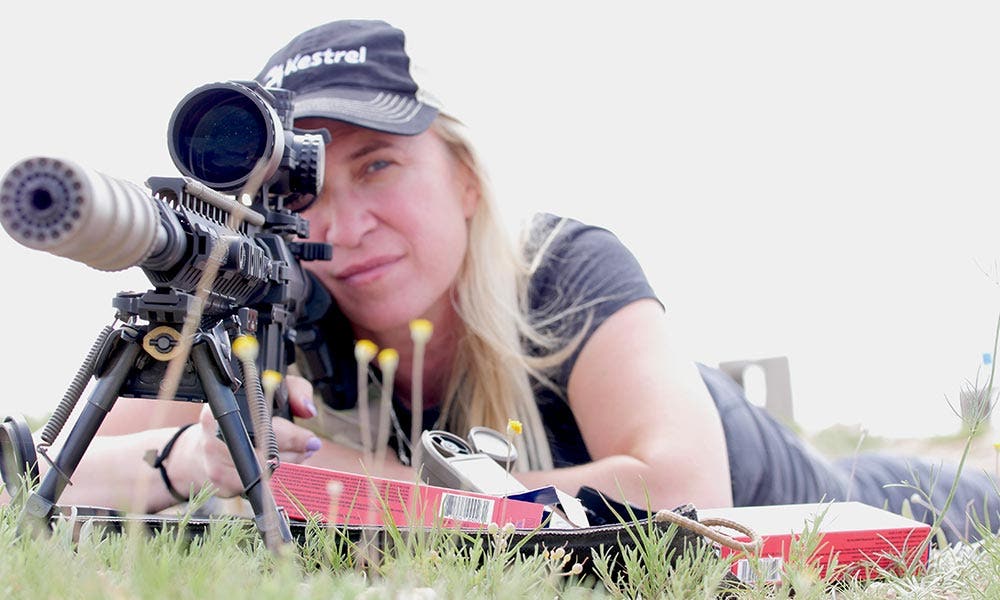 All About Muzzle Velocity
Truing your muzzle velocity is an important step for achieving shooting accuracy, though I often hear shooters say that they skip it. I've found that the ones who tend to skip that step, are also, frequently, the same shooters that then talk about missing the mark at long range shots.
All About Muzzle Velocity
Truing your muzzle velocity is an important step for achieving shooting accuracy, though I often hear shooters say that they skip it. I've found that the ones who tend to skip that step, are also, frequently, the same shooters that then talk about missing the mark at long range shots. -
 Kestrel Meters: Training Tool for Better Long Range Shooting
As a long-range rifle instructor, I get asked all the time about the equipment we use to accomplish our long-range shots. Equipment and techniques change over time with advancements in technology, but some have serious staying power. I started shooting long range long before there was even a laser range finder available to get accurate distances. The one item that has been a constant in my long-range kit from very early on has been a Kestrel weat
Kestrel Meters: Training Tool for Better Long Range Shooting
As a long-range rifle instructor, I get asked all the time about the equipment we use to accomplish our long-range shots. Equipment and techniques change over time with advancements in technology, but some have serious staying power. I started shooting long range long before there was even a laser range finder available to get accurate distances. The one item that has been a constant in my long-range kit from very early on has been a Kestrel weat - Canadian Sniper Team: Going Inside the Record-Breaking Long Distance Shot Recently, the Washington Post ran a story on the Canadian Special Operations sniper that successfully shot an ISIS target in Iraq from more than 2 miles away. It’s being reported as breaking a world record for the longest confirmed kill shot in history. This feat beats the previous record for longest confirmed kill shot in combat by 1,065 meters.
-
 Catching up with Kestrel Precision Shootout winner Dave Preston
This past April Kestrel Ballistics was once again the title sponsor of the Kestrel Precision Shootout at Peacemaker National Training Center in Gerrardstown, WV. A few new wrinkles were added to the competition this year, including a charity shoot on zero day benefiting AmericanSnipers.org. Over $3,000 was raised, a true testament to the kindness and generosity of the PRS community.
Catching up with Kestrel Precision Shootout winner Dave Preston
This past April Kestrel Ballistics was once again the title sponsor of the Kestrel Precision Shootout at Peacemaker National Training Center in Gerrardstown, WV. A few new wrinkles were added to the competition this year, including a charity shoot on zero day benefiting AmericanSnipers.org. Over $3,000 was raised, a true testament to the kindness and generosity of the PRS community. -
 See you in Atlanta for the NRA Annual Meetings!
Kestrel Ballistics will be attending the NRA Annual Meetings taking place in Atlanta, GA on April 28-30, featuring the latest improvements to their rugged environmental and ballistics weather meters. The Kestrel Ballistics line of portable weather meters and data loggers continues to add to its list of compatible technology partners with laser range finders and other accessories that work with the Kestrel Elite for long-distance shooting solution
See you in Atlanta for the NRA Annual Meetings!
Kestrel Ballistics will be attending the NRA Annual Meetings taking place in Atlanta, GA on April 28-30, featuring the latest improvements to their rugged environmental and ballistics weather meters. The Kestrel Ballistics line of portable weather meters and data loggers continues to add to its list of compatible technology partners with laser range finders and other accessories that work with the Kestrel Elite for long-distance shooting solution -
 Kestrel At CORE Gas Gun PRS
Recently, Katie Godfrey, Kestrel’s Global Account Executive, participated in her first PRS match at the CORE Gas Gun Precision Rifle Series. Katie is certainly no stranger to the gun range and now it sounds like you can expect to see her more often on the PRS circuit. Check out this Q & A with Katie, for first-timer tips and to see how she placed.
Kestrel At CORE Gas Gun PRS
Recently, Katie Godfrey, Kestrel’s Global Account Executive, participated in her first PRS match at the CORE Gas Gun Precision Rifle Series. Katie is certainly no stranger to the gun range and now it sounds like you can expect to see her more often on the PRS circuit. Check out this Q & A with Katie, for first-timer tips and to see how she placed. - Interviewing Bryan Litz of Applied Ballistics | Kestrel Instruments Bryan Litz, President and Founder of Applied Ballistics recently visited the Nielsen-Kellerman headquarters where the Kestrel 5700 Elite Weather Meter with Applied Ballistics is made to discuss what’s new and what’s next in shooting technology.
- Gateway to the Battlefield: A Sniper and His Optic A defining moment for a sniper is when he can positively identify a threat within his area of operation and exercise certain actions, from an intelligence report to target neutralization. The ability to identify a target is vital in a stability operation or counterinsurgency (COIN) environment, where precisely aimed fire is at a premium and collateral damage isn’t an option.
- Kestrel Meters Critical to Sniper Training Kestrel meters play an important role in sniper training and operations, supplying all relevant environmental conditions needed for accuracy in long-distance shooting. With instant heat stress index and optional Bluetooth data transfer capabilities, the Kestrel 4000 series also allows instructors to monitor the health and safety of personnel during training in extreme, potentially dangerous conditions.


